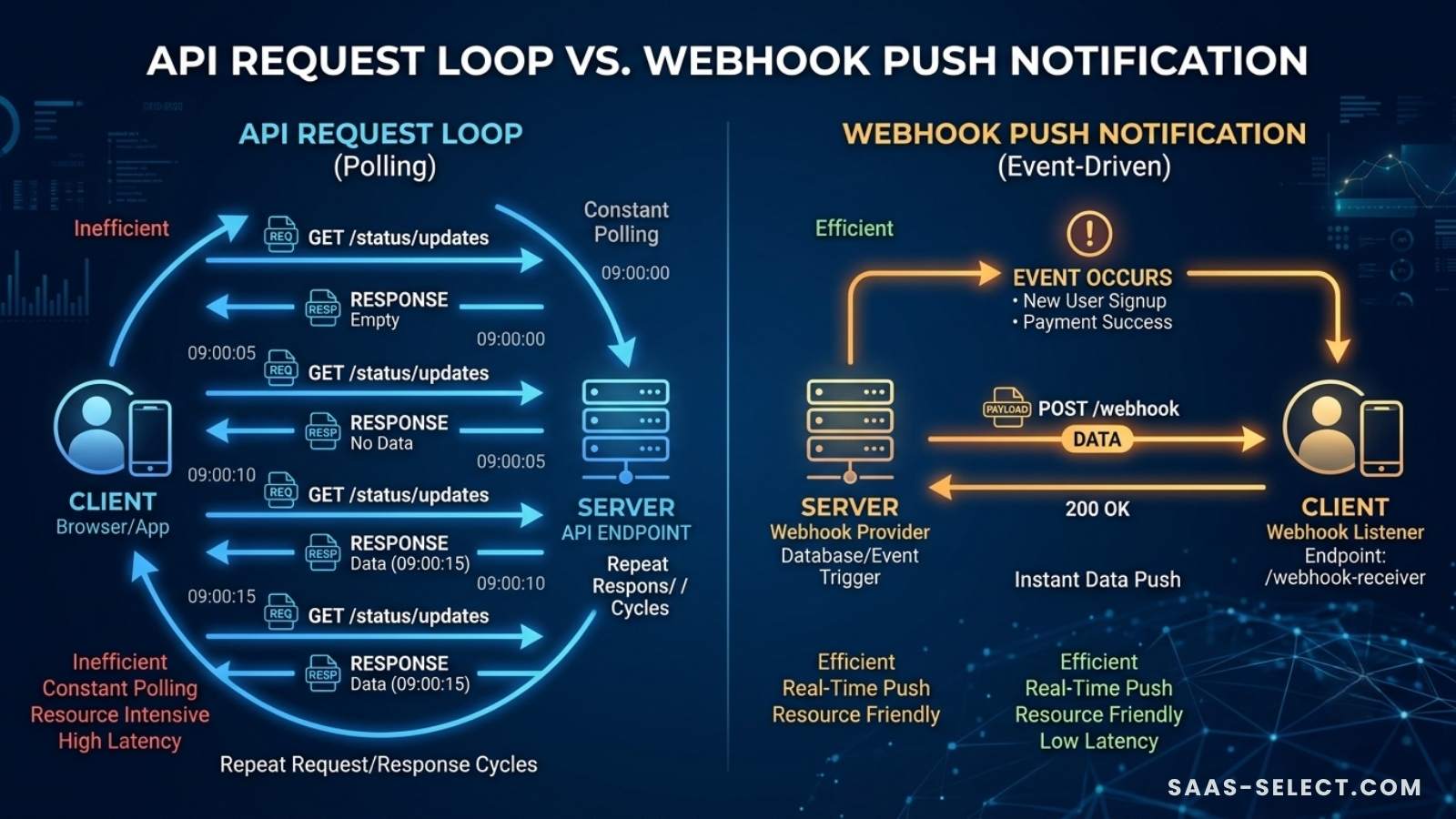
API vs Webhooks: A Simple Guide for Solopreneurs
The ultimate leverage for a solopreneur is automation. Whether you are synchronizing stock across digital marketplaces or scheduling large content clusters across multiple accounts, making your apps talk to each other is how you scale without a massive team.
When you dive into no-code automation platforms or browse software documentation, you will constantly encounter two terms: APIs and Webhooks.
Both mechanisms move data from one application to another. However, they operate on completely opposite philosophies.
Understanding this distinction is the key to building fast, resource-efficient automation pipelines that don’t break or drain your budget. Let’s demystify APIs and Webhooks without the confusing technical jargon.
What is an API? (The Restaurant Analogy)
API stands for Application Programming Interface. Think of an API as a digital waiter in a restaurant.
You (the customer/App A) are sitting at the table. The data you want is inside the kitchen (App B). You cannot walk into the kitchen yourself, so you hand an order to the waiter (the API). The waiter walks to the kitchen, retrieves the exact data you requested, and brings it back to your table.
Crucially, an API only works when you ask for it. It is a pull-based communication system. If you want updated information, you must send the waiter back to the kitchen.
The Problem with Polling
If App A needs to know the exact moment something changes in App B using a standard API, it uses a technique called polling.
Imagine sitting in your car and asking your phone every 60 seconds: “Am I there yet? Am I there yet?” That is polling. It wastes server power, API rate limits, and processing bandwidth because 99% of those requests return no new data.
What is a Webhook? (The Text Message Analogy)
A Webhook is a reverse API. Instead of a pull-based system, it is a push-based system triggered by events.
Instead of ordering from a waiter repeatedly, think of a Webhook as signing up for package delivery text alerts. You order an item online, give the merchant your phone number, and go about your day. You do not call the warehouse every five minutes asking where your box is. Instead, the moment the package drops on your porch, the warehouse automatically pushes a text notification to your phone.
In software terms, App A tells App B: “Here is my unique URL. Don’t wait for me to ask. The exact second a specific event happens, push that data directly to this URL.”
API vs. Webhook: The Direct Comparison
To structure your automated workflows properly, compare how these two systems operate across core performance metrics:
| Operational Metric | API (Pull System) | Webhook (Push System) |
|---|---|---|
| Data Flow Direction | Client requests data from Server | Server automatically pushes data to Client |
| Trigger Mechanism | Manual or scheduled interval (Polling) | Real-time event occurrence |
| Efficiency | Low (Wasteful requests when no data changes) | High (Only transmits when something actually happens) |
| Real-Time Speed | Delayed (Dependent on your polling schedule) | Instantaneous (Milliseconds after the event) |
| Primary Use Case | Fetching historical data or modifying databases | Instant notifications and cross-app triggers |
Real-World Scenarios: Which One Should You Use?
Knowing when to deploy an API vs. a Webhook saves you hundreds of dollars in automation platform operations fees on tools like Make or Zapier.
When to rely on an API:
- Massive Bulk Extractions: Pulling the last 30 days of analytics from a platform to generate a monthly report.
- Database Updates: Pushing a bulk list of 50 new design asset strings from your local inventory tracking sheet up into a central platform.
- Search Queries: Checking if a specific username or domain name is available on demand.
When to demand a Webhook:
- Order Processing: Triggering a fulfillment sequence or sending a welcome email the exact millisecond a customer buys an asset.
- Status Changes: Getting an instant ping on your dashboard when an external graphics script finishes rendering a high-resolution mockup asset.
- Content Schedulers: Triggering a secondary confirmation update to your operational log the second a post goes live.
Summary: Building a Smarter Tech Stack
You do not need to choose between APIs and Webhooks. Elite solopreneurs combine them. Use Webhooks to listen for instant business events, and use APIs to fetch deep historical data or make complex updates when those events occur.
By understanding how data moves across the web, you can design workflows that are faster, lighter, and completely hands-off. Stop polling, start listening to events, and let your software stack do the heavy lifting while you focus on macro growth.