Static Sites vs Traditional CMS: Why We Use Astro (2026)
Choosing where your content lives and how it is served to your audience is a critical infrastructure decision.
For over a decade, the default answer was a traditional monolithic Content Management System (CMS) like WordPress. Traditional platforms lowered the barrier to entry, allowing anyone to deploy a website without touching a code editor.
However, as search engine algorithms evolved and attention spans shrunk, the architectural flaws of monolithic systems became massive performance and SEO bottlenecks.
When engineering SaaS Select, we rejected traditional database-driven infrastructure. Instead, we built our platform using Astro, a cutting-edge Static Site Generator (SSG). Static site frameworks completely outperform traditional software setups for modern B2B content marketing.
For more on why performance matters for SEO, check our PageSpeed Insights analysis.
1. The Real-Time Database Tax
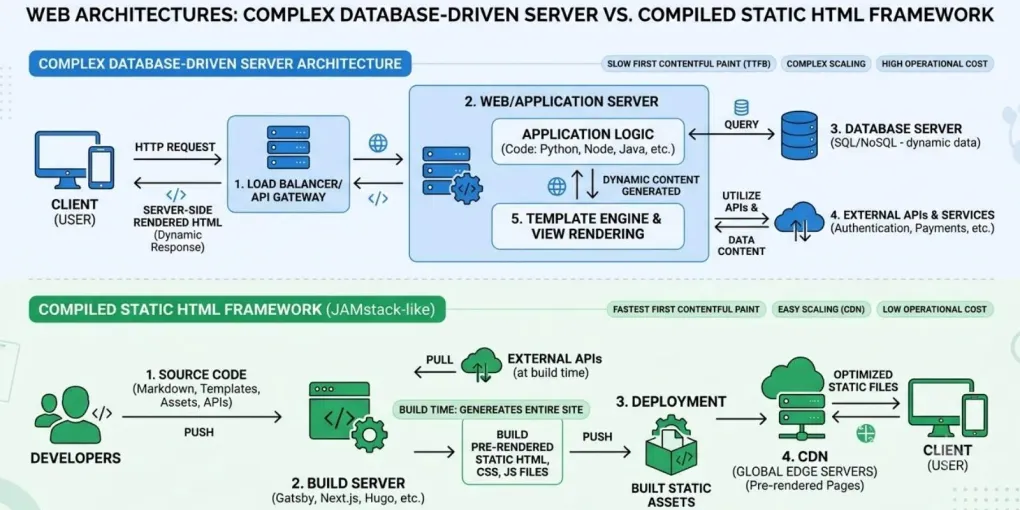
Traditional CMS platforms rely on a dynamic, multi-step assembly line that triggers every single time a user clicks a link:
- The user’s browser sends a request to the web server.
- The server executes code (like PHP) to talk to a central database (like MySQL).
- The database fetches the post title, body text, sidebar widgets, and theme layout options.
- The server compiles these scattered pieces into a temporary HTML page and sends it back to the user.
If 10,000 users visit your site simultaneously, your server runs this exhausting fetching assembly line 10,000 separate times. This causes server lag, high hosting costs, and catastrophic crashes during unexpected traffic surges from platforms like Pinterest or viral social threads.
2. The Static Site Paradigm
Static Site Generators turn this dynamic model upside down by moving the assembly line phase entirely.
With Astro, page compilation happens on the build server, not when the user clicks the link. When we write an article in a clean Markdown (.md) file and run our deployment build script, Astro instantly parses the text, merges it with visual layout components, and outputs raw, pre-rendered, flat HTML, CSS, and JavaScript files.
When a user visits a static site, the server does zero heavy lifting. It simply hands over a pre-built, lightweight HTML file instantly. It is the digital equivalent of handing someone a printed flyer instead of forcing an artist to draw it on demand.
3. Why Astro Wins for High-Intent B2B Media
While there are many static site frameworks on the web, Astro provides three specific operational advantages:
Zero JavaScript by Default (Island Architecture)
Most modern JavaScript frameworks force users to download massive, bloated script packages just to read a text-based blog post. Astro uses “Server Islands” to render 100% pure, static HTML by default. If a page requires a small touch of dynamic interactivity, Astro only ships the exact microscopic lines of JavaScript needed for that specific element, keeping the rest of the site incredibly lean.
Unmatched Page Speed and Core Web Vitals
Search engines like Bing prioritize user experience metrics, specifically Largest Contentful Paint (LCP) and First Input Delay (FID). Because Astro site builds consist of flat, pre-compiled text files, they load in a fraction of a second. Fast loading times drastically lower your bounce rates and structurally boost your organic ranking positions across commercial search queries.
Bulletproof Security and Stability
Because there is no active database or server-side execution happening at runtime, static sites are practically unhackable. There are no SQL databases to inject malicious code into, no admin login dashboards for bots to brute-force, and no plugins requiring constant security patching. Your site stays online, safe, and lightning-fast 100% of the time.
Technical Comparison Matrix
| Architectural Vector | Traditional Monolithic CMS | Modern Static Site (Astro) |
|---|---|---|
| Page Rendering | Dynamic compilation on every user click | Pre-rendered once during build |
| Database Requirement | Live relational database (MySQL/PostgreSQL) | None at runtime (flat Markdown files) |
| Average Loading Speed | Slow to moderate (depends on caching) | Near-instantaneous (raw HTML delivery) |
| Security Risk Profile | High (vulnerable to theme, plugin, DB exploits) | Virtually Zero (no runtime attack surface) |
| Hosting Overhead | Expensive (requires managed hosting) | Cost-effective / Free (edge networks) |
Designing for Digital Longevity
Building a digital business is about eliminating unnecessary variables. Relying on heavy, database-dependent website engines introduces performance risks, security vulnerabilities, and maintenance headaches.
Shifting platform infrastructure to a compiled static architecture using Astro ensures maximum technical efficiency. The site is secure, incredibly cheap to scale, and heavily optimized out of the box to score perfect technical grades on search engine algorithms. We spend less time patching databases and more time producing high-value, high-impact content for our audience.
For a deeper dive into site optimization, read our guide on optimizing PNG file sizes for fast websites and our approach to digital asset management.
Frequently asked questions
Why is a static site better for SEO than a traditional CMS?
Static sites load faster because pages are pre-rendered as flat HTML files. This improves Core Web Vitals (LCP, FID, CLS), which are ranking factors for Google and Bing. Traditional CMS platforms generate pages dynamically with every request, causing slower load times and higher bounce rates.
Is Astro suitable for a POD blog or content-heavy site?
Yes. Astro is specifically designed for content-driven sites. It renders 100% static HTML by default and only loads JavaScript when needed. This makes it ideal for blogs, documentation sites, and marketing pages where speed and SEO are critical.
What are the downsides of a traditional CMS like WordPress?
Traditional CMS platforms require a database, server-side processing, and frequent security updates. They are vulnerable to SQL injection, brute-force attacks, and plugin vulnerabilities. They also struggle with traffic spikes because each request triggers a full database query and page assembly process.
Can I migrate my existing POD blog from WordPress to Astro?
Yes, but it requires technical expertise. You would need to export your content (posts, pages, media) and rebuild your site in Astro. The benefit is significantly improved performance, security, and lower hosting costs. However, if you're comfortable with WordPress and don't have performance issues, migration may not be necessary.