Bulk Upload Designs to Printful: File Optimization Rules
Executing a flawless automation strategy requires strict technical discipline before you ever hit the upload button. When you push a single design through a portal, you can manually fix positioning bugs. But when you execute an automated batch process to bulk upload designs to Printful, a single formatting error multiplies across hundreds of live listings, wasting valuable ranking power on search engines.
To ensure your asset library integrates cleanly with automated fulfillment setups, you must enforce strict optimization parameters. Here are the structural rules to clean your assets for high-volume publishing.
Canvas Standardizing and DPI Boundaries
The most common point of failure in an automated publishing pipeline is non-uniform canvas dimensions. If your asset library contains mixed dimensions some vertical posters, some square graphics, and some wide typography clips the rendering engine will distort your layout placements.
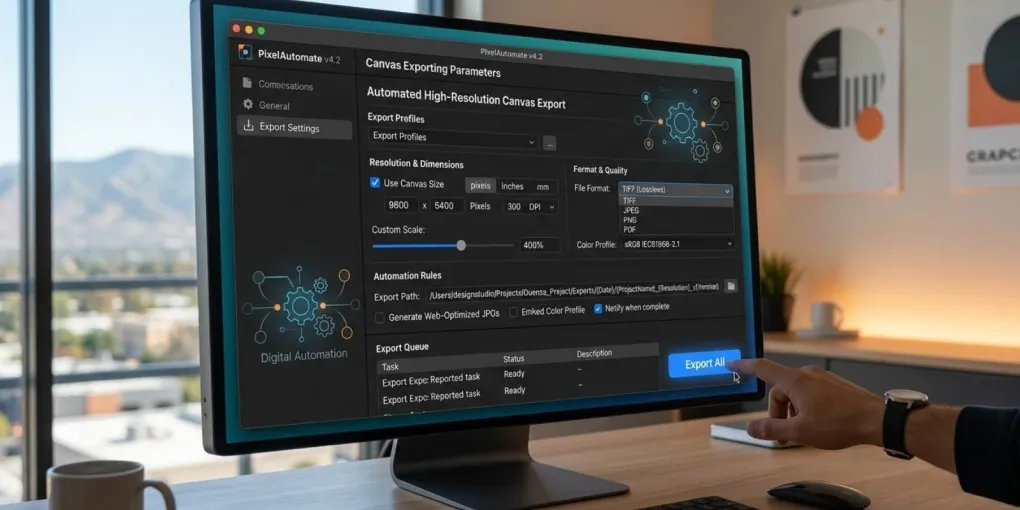
Standardize your primary design canvas to 4500 x 5400 pixels (15 x 18 inches) at 300 DPI. This layout grid matches the baseline architecture of major print fulfillment systems.
By centering your graphics within this uniform transparent bounding box during export, you guarantee that every single item maps perfectly onto your blanks without manual cropping. When handling apparel like hoodies, keeping your artwork carefully balanced within the upper half of this frame prevents the automated rendering engine from shifting or stretching your designs. It ensures chest graphics remain centered and safely above the pocket line during high-volume catalog processing.
Enforcing Transparency and Color Profiles
Automated background removal tools are unreliable for intricate graphic styles, especially for detailed artwork like vintage woodcut engravings, dark academia aesthetics, or fine alchemical line art.
- Native Transparency: Export your files as true 8-bit or 24-bit transparent PNG elements. Ensure no stray pixels or semi-transparent halos remain around the borders of your graphics.
- Color Profiles: Configure your digital workspace to sRGB IEC61966-2.1. While professional textile printers utilize CMYK inks, cloud API submission platforms require sRGB files for web mockups, converting the data on their end during final production.
Alphanumeric File Naming Architecture
Automated file parsers frequently choke on special characters, spaces, or nested parentheses. Rename your localized asset database systematically before executing your batch routine. Keeping your file names lean and restricted to a strict alphanumeric structure helps keep your cloud metadata organized right from the start.
| Bad Filename Format (Causes API Errors) | Optimized Filename Format (Clean Processing) |
|---|---|
DarkAcademia Skull Design (v2) FINAL.png | dark-academia-skull-design-v2.png |
gothic raven engraving copy.png | gothic-raven-engraving-copy.png |
polyhedral_dice_ttrpg_180 C.png | polyhedral-dice-ttrpg-180.png |
Keep all names strictly lowercase, use hyphens as separators, and strip out non-ASCII symbols entirely to avoid breaks mid-pipeline.
Connecting the Infrastructure to Bulk Upload Designs to Printful
Once your directory is sanitized, import the files into your cloud dataset. From there, you can launch your publishing workflow directly to your catalog provider. Utilizing a print execution platform like Printful ensures that your optimized sRGB profiles translate into vivid, high-durability garment prints automatically.
For a comprehensive breakdown on how to map these optimized files within a centralized automation hub, read our dedicated MyDesigns to Printful workflow guide. If your batch files contain dense typography layouts, make sure you audit your font assets using a dedicated font manager setup to eliminate corrupted file metadata before exporting.
Frequently asked questions
What is the best file size for Printful bulk uploading?
The standard resolution is 15x18 inches at 300 DPI (4500x5400 pixels). Maintaining this uniform bounding box across your entire design dataset prevents scaling and positioning misalignment during bulk API uploads.
Should I use PNG or smart vector files for bulk automation?
Always use transparent PNG files for automated print pipelines. While vector files are great for editing, automated layout systems map flat transparent pixel grids much more reliably across diverse product catalogs.
Why do my bulk uploaded designs look blurry on apparel?
This happens if your source files are lower than 300 DPI or if you scaled a small thumbnail asset up to fit the print canvas. Always export your original artwork natively at full print dimensions.
How should I name files to bulk upload designs to Printful?
Use lowercase alphanumeric characters separated only by hyphens. Stripping spaces, parentheses, and special symbols prevents API parser timeout errors during high-volume upload routines.
More from this series
Tools mentioned in this guide