Font Manager for POD Sellers: Organize Thousands of Fonts
Most POD sellers hit the same wall around the 500-font mark. Design software starts lagging on startup. Finding a specific gothic blackletter for a Dark Academia listing means scrolling through hundreds of irrelevant entries. And somewhere in a downloads folder sits a pile of ZIP files that haven’t been unpacked yet.
A font manager solves all three problems. Here’s how to set one up properly for a commercial design workflow without touching your operating system.
Why Your OS Font Library Doesn’t Scale
Your computer’s native font directory was built for normal usage a few dozen fonts, loaded once at startup. It was never designed for the volume that serious POD work requires.
When you install thousands of typefaces directly into your OS, two things happen. Every application that reads system fonts Photoshop, Illustrator, Canva desktop loads all of them at launch. That initialization adds time every session and consumes RAM throughout. And the system’s built-in font picker has no filtering logic beyond alphabetical order. Finding something that “feels like a 1920s library stamp” requires memory, not a search bar.
Your tools slow down, and your creative decisions slow down with them.
What a Font Manager Actually Does
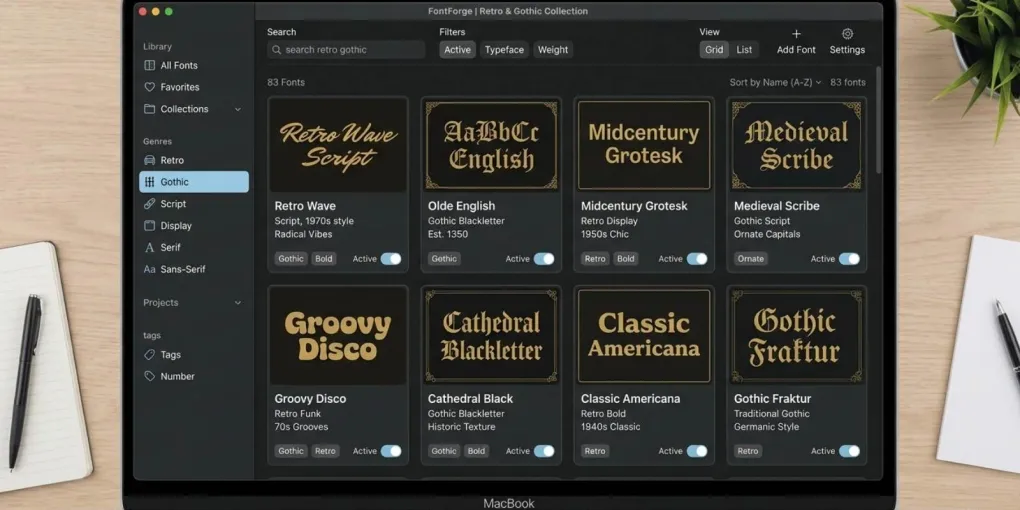
A font manager sits between your font files and your design software. Instead of installing typefaces permanently into your OS, you keep them in a dedicated directory and activate only what you need for the current project.
On-demand activation. You enable a collection say, Dark_Academia_Serif and those fonts become temporarily available in every open application. When you deactivate the set, your system returns to its clean baseline. No restart required.
Tag-based search. Good font managers let you attach your own metadata mood, era, use case, niche. Searching “gothic” or “distressed” returns only the assets you’ve tagged that way.
Preview against real text. You type a sample string once and every font in your library renders it simultaneously. Finding the right feel for a listing title takes minutes, not a scrolling session in Photoshop.
How to Structure Your Collections for POD
The biggest organizational mistake is sorting by foundry name or download source. That logic works for archivists, not for POD sellers building niche collections at speed.
Sort by customer archetype instead:
/Niche_Dark_Academia
/Niche_Tabletop_RPG
/Niche_Vintage_Library
/Niche_Gothic_Horror
/Utility_Legibility
When you open a new design session, you activate one niche collection. Everything that loads is immediately relevant. You’re making design decisions, not font decisions.
Choosing a Font Manager: What Actually Matters
Several options exist. The features that count for commercial POD work:
Auto-activation. The manager detects which fonts a project file requires and activates them automatically when you open it. Essential for maintaining a large catalog of older designs.
Duplicate detection. After downloading from multiple subscriptions over time, duplicates accumulate. A manager that flags them prevents library bloat.
OTF/TTF support. For POD production, prioritize OTF files. They contain better glyph metadata, scale more cleanly at high resolution, and handle special characters more reliably than legacy TTF. Your manager should handle both.
Cloud sync. If you work across multiple devices, cloud backup preserves your tag structure without rebuilding from scratch. Covered in detail in the cloud font workflow guide.
Popular options in 2026: Suitcase Fusion, RightFont, FontBase (free tier available), and Creative Fabrica’s own Fontcloud a browser-based manager built specifically for CF downloads.
The Licensing Layer You Can’t Ignore
Organizing your fonts is only half the problem. The other half is knowing which ones you can actually use commercially.
Fonts from unregulated free sites frequently carry “free for personal use” licenses that explicitly exclude merchandise sales. One sale with an unlicensed font creates legal exposure on your entire store.
The clean solution is sourcing entirely from platforms that issue explicit commercial licenses at download. Creative Fabrica’s freebie program covers this for individual assets see what Creative Fabrica freebies actually include. Sourcing clean, licensed typography guarantees that when you push your final apparel designs to automated production platforms like Printful, your storefront remains fully compliant and protected against sudden copyright strikes. For systematic sourcing at volume, the CF vs Envato Elements comparison covers which subscription fits POD commercial workflows.
Operational Rules for a Clean Library
A few habits that prevent library decay over time:
Sanitize filenames before import. Spaces, parentheses, and version numbers in filenames cause errors with automated tools and bulk mockup generators. Rename before importing: dark-academia-gothic-bold.otf, not DarkAcademia Gothic BOLD (v2) FINAL.otf.
Keep license files alongside the asset. Store the license PDF or TXT in a /licenses subfolder inside the same niche collection. If a marketplace sends a copyright query, that file is your response.
Run a quarterly audit. Every three months, deactivate anything that hasn’t opened in a design session. Keeps your active library lean.
Back up your tag database. Your font files can be redownloaded. Your custom tag structure hundreds of hours of classification work cannot. Most managers export it as a single configuration file. Back it up weekly to cloud storage.
Frequently asked questions
What is the best font manager for print-on-demand sellers?
FontBase offers a capable free tier. RightFont and Suitcase Fusion are strong paid options with better auto-activation. Creative Fabrica's Fontcloud works specifically for CF downloads and is included with any account.
How many fonts can I install before Photoshop slows down?
Performance degradation typically starts around 1,000 to 2,000 system-installed fonts. With a font manager handling on-demand activation, you can maintain a library of 10,000 or more without impacting startup time.
Should I use OTF or TTF for print-on-demand?
OTF when available. It scales more precisely at high resolution and carries better glyph metadata for automated rendering pipelines. Use TTF only when OTF is not included in the download.
Can I use free fonts from Creative Fabrica for Redbubble?
Yes, under the Basic POD license included with free downloads. Check the specific license for any revenue thresholds that might require an upgraded license at higher sales volumes.
Do I need to reinstall fonts when I switch computers?
With a cloud-backed font manager, no. Your library and tag structure sync to the new machine. Without cloud backup, you would need to transfer files and rebuild collections manually.
More from this series