Printful Hoodie Print Area: Perfect Above-Pocket Placement
Nothing ruins the premium feel of independent streetwear faster than bad print placement. When creating custom hoodies for a Dark Academia, Gothic, or tabletop RPG storefront, your typography and intricate vector art must look intentional.
The biggest pitfall for automated sellers is ignoring the physical constraints of the garment. Misjudging the Printful hoodie print area pocket lines results in distorted prints, visible ink bleeding, and high customer return rates. Here is the technical blueprint to ensure your graphics sit perfectly every time.
Mechanical Realities of DTG Hoodie Printing
Direct-to-Garment (DTG) printing functions exactly like a high-end industrial inkjet printer for apparel. For the ink to bind perfectly with the fabric fibers, the printhead must pass over a completely flat surface.
Custom hoodies feature a major structural obstacle: the front kangaroo pocket.
The seams where the pocket is stitched onto the main body create a massive elevation change. If your artwork file overlaps or sits directly against these seams, the printer nozzles cannot maintain the correct spray distance. The result is a blurred design border, faded colors along the stitch line, and a print that will crack and peel after a single machine wash.
The Placement Rule: Center on Chest, Above the Pocket
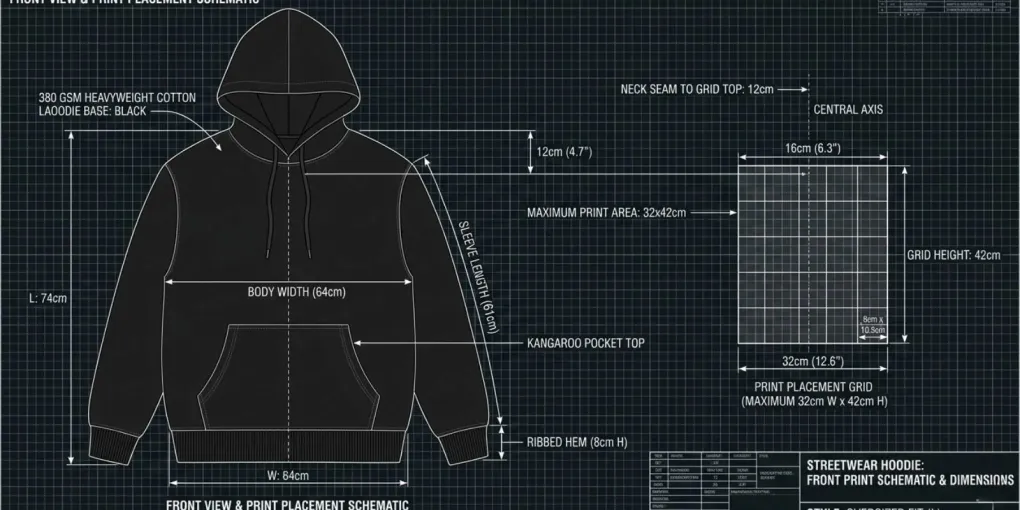
To achieve a professional, retail-ready finish, your automated design files must follow a strict placement rule: the artwork must be centered on the chest and placed strictly above the front pocket.
| Garment Section | Placement Status | Technical Requirement |
|---|---|---|
| Upper Chest Area | SAFE ZONE | Center artwork perfectly within this high frame |
| Kangaroo Pocket Line | DANGER ZONE | NEVER allow graphic elements to cross or touch this seam |
By keeping a safe buffer zone of at least 1 to 2 inches above the top pocket seam, you guarantee that the DTG printer platen can clamp the garment completely flat. This ensures crisp borders on fine details like woodcut line-art, ancient alchemical symbols, or detailed typography layouts.
Automating the Safe Zone in Your Export Pipeline
You do not need to manually reposition every single listing inside your publishing dashboard. Instead, build the safe zone directly into your automated canvas templates before bulk exporting your PNG graphics:
- The Canvas Box: Utilize your standard 4500 x 5400 pixel bounding box.
- Top-Heavy Alignment: Position your main graphic elements strictly within the upper 60% of the canvas workspace.
- Transparent Buffer: Leave the bottom 40% of the pixel map completely blank and transparent.
When your bulk automation software maps this file onto a premium hoodie blank via Printful, the transparent canvas baseline pushes the actual artwork up to the chest naturally, completely avoiding the dangerous pocket zone.
Maximizing Your Collection Consistency
Standardizing your asset positioning ensures that your storefront mockups maintain a consistent, high-end look across your entire catalog. This level of professional staging is exactly what search engines look for when crawling digital brands.
To learn how to sync these optimized hoodie file structures into an automated cloud repository, read our complete MyDesigns to Printful workflow guide. For the foundational rules on sanitizing your filename databases and managing your export DPI settings before launching a batch upload, consult our comprehensive bulk upload file optimization rules.
Frequently asked questions
What is the maximum print area for a Printful hoodie?
The standard front print area for custom hoodies is 12x12 inches on average, varying slightly by garment size. However, the crucial placement rule is keeping the design files strictly above the kangaroo pocket line.
Why does printing too close to the hoodie pocket cause errors?
Industrial DTG printers require a perfectly flat surface. Printing over or near thick structural seams like the front pocket creates uneven ink distribution, resulting in blurred graphics and fast design peeling.
How do I center my design on a hoodie for batch upload?
Center your graphic elements in the top section of your 4500x5400 pixel export file. Leaving the bottom third of the canvas completely transparent automatically forces the artwork above the front pocket seam.
More from this series
Tools mentioned in this guide