BulkMockup vs MyDesigns: Ultimate POD Automation Guide
High-volume print-on-demand (POD) operators inevitably hit a structural ceiling where design creation is no longer the bottleneck. The actual operational drain shifts to asset rendering and marketplace publishing.
When managing a catalog spanning thousands of active SKUs, traditional manual asset management breaks down. The core operational challenge lies in choosing a processing architecture: a centralized cloud hub that handles both listing data and basic asset generation versus a localized engine optimized exclusively for complex visual rendering.
Sellers scaling shops across Etsy, Shopify, and Amazon face an expensive dilemma. Existing browser-based design generators regularly fail to handle precise graphic placements on varied apparel styles, resulting in misaligned mockups, customer returns, and wasted advertising spend.
Conversely, relying entirely on localized graphic workflows often detaches asset generation from the marketplace publishing pipeline, slowing down time-to-market. Resolving this operational friction requires a direct architectural comparison between two market-leading automation platforms: BulkMockup and MyDesigns.
MyDesigns: The Cloud Speed King
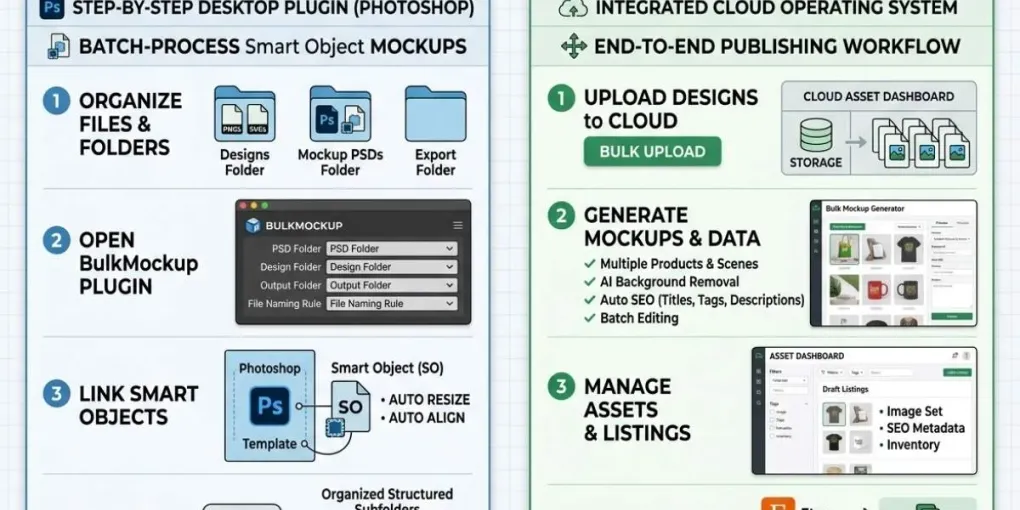
MyDesigns functions as an all-in-one, browser-based digital asset management (DAM) system and publishing hub built explicitly for POD operations. Instead of treating mockup creation as an isolated step, the platform integrates file storage, automated metadata generation, and direct API publishing into one cohesive system.
The primary competitive advantage of MyDesigns is its end-to-end cloud pipeline. Users can upload a CSV manifest along with hundreds of raw PNG design files into a cloud spreadsheet interface. From there, the platform’s native AI models automatically parse the file names or design elements to generate optimized product titles, structured tags, and description fields tailored to Etsy and Shopify SEO algorithms.
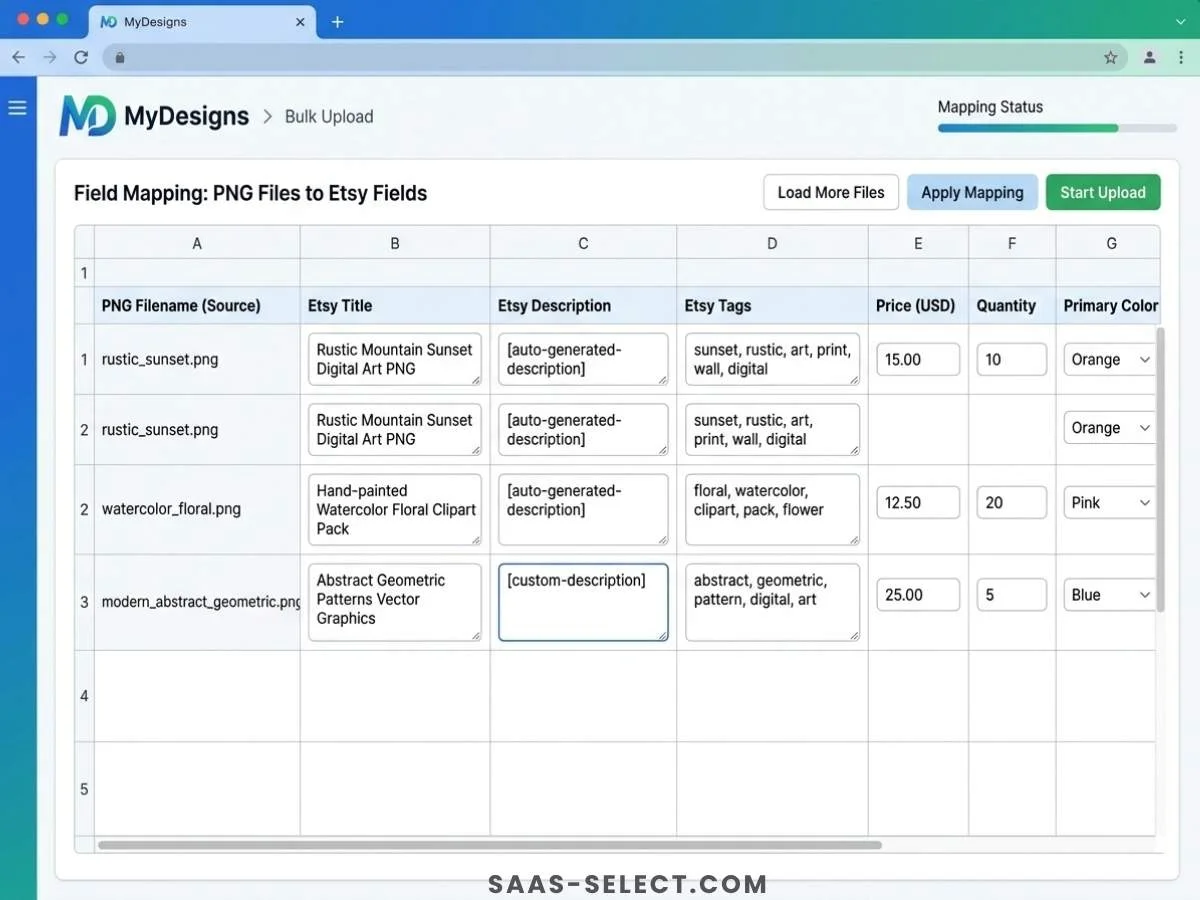
For high-volume operators who need to push hundreds of listings daily, this browser-based synergy eliminates hours of manual copy-pasting. For a comprehensive breakdown of its machine-learning capabilities, check out our deep dive into MyDesigns AI features.
However, cloud-based asset generation inherently sacrifices structural flexibility. Because MyDesigns renders assets on remote servers using standard canvas overlays, it struggles with highly complex Photoshop templates that require advanced layer blending, displacement maps, or precise warping around fabric folds. It also requires tight operational oversight to avoid platform penalties, such as Redbubble’s strict limit of 15 tags max.
Pros of MyDesigns
- Unified Workspace: Combines cloud asset storage, automated SEO copywriting, and direct shop publishing within a single browser tab.
- Rapid Multi-Product Creation: Generates listings across multiple product variants simultaneously, like matching t-shirts, mugs, and hoodies.
- Zero Local Overhead: Processing occurs entirely on cloud infrastructure, freeing up local RAM and CPU resources for other operations.
Cons of MyDesigns
- Subscription Overhead: High-volume tiers require recurring monthly fees, increasing baseline operational costs.
- Rigid Positioning Rules: Fails to accurately process multi-layered Photoshop Smart Objects that require deep distortion or precise custom textures.
- Bandwidth Reliance: Performance is directly tied to internet upload speeds when transferring large batches of high-resolution source designs.
BulkMockup: Uncompromising Precision
BulkMockup approaches print-on-demand automation from a fundamentally different technical standpoint. It operates as a local execution layer that hooks directly into Adobe Photoshop on your desktop, automating the extraction and replacement of Smart Objects across thousands of nested PSD files.
For design purists and brands whose conversion rates depend on ultra-realistic, premium lifestyle photography, local processing is mandatory. Cloud tools frequently use flat, static overlays that fail to account for the physical dimensions of physical garments.
During our rigorous evaluation, we observed that automated web apps regularly stretch or misalign graphics when translating a design from a flat t-shirt onto a heavy hoodie template. This error frequently places graphics over front handwarmer pockets or distorts them across seams.
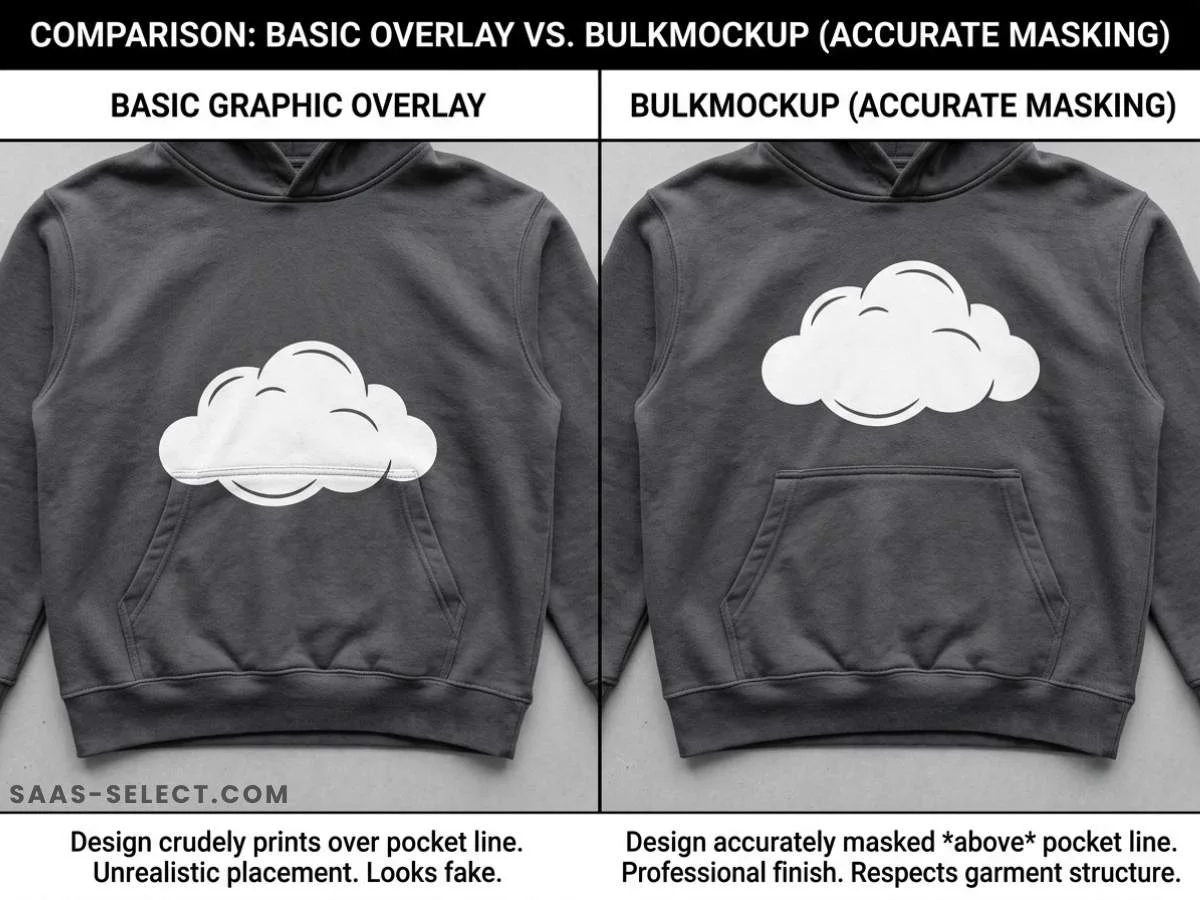
BulkMockup solves this specific issue by respecting every native constraint configured within your Photoshop template. It guarantees that designs applied to complex apparel remain strictly centered on the upper torso, ensuring chest or pocket graphics are perfectly positioned and never awkwardly overlap a middle pocket or sleeve seam during batch processing.
The software automatically traverses directory trees, identifies design files, launches Photoshop, replaces the designated smart layers, adjusts canvas dimensions dynamically, and exports organized, compressed JPEG output structures. To understand the baseline benchmarks of this local architecture, you can read our full BulkMockup testing methodology.
Pros of BulkMockup
- Pixel-Perfect Smart Objects: Full compatibility with advanced Photoshop features, including displacement maps, shadow layers, and custom blend modes.
- One-Time Cost Structure: Protects long-term business margins by eliminating monthly platform fees via a lifetime license model.
- Offline Execution: Operates entirely independent of network latency or internet availability, rendering assets directly from local storage arrays.
Cons of BulkMockup
- Local Hardware Demands: Processing speed is constrained by your local computer’s hardware specifications like CPU cores, NVMe drive speed, and available RAM.
- No Built-In Publishing: Outputs raw image files locally, requiring external tools or manual work to upload assets and create marketplace listings.
- Platform Dependence: Requires a running, paid subscription to Adobe Photoshop to execute the automation scripts.
The Financial Breakdown
Choosing between these tools requires matching your monthly listing volume with your capital allocation strategy. MyDesigns relies on a standard SaaS recurring model, whereas BulkMockup uses a traditional single-purchase license configuration.
| Operational Metric | MyDesigns (Pro / Pro Plus Plans) | BulkMockup (Lifetime License) |
|---|---|---|
| Pricing Model | $22.99 to $74.99 per month | $147 one-time fee |
| Hosting Environment | Fully Cloud-Hosted | Local Desktop Application |
| Photoshop Requirement | None (Independent Canvas Engine) | Mandatory Adobe Photoshop License |
| Asset Export Limits | Capped by plan tier cloud storage | Unlimited (Restricted only by hard drive space) |
| Listing Creation | Direct API Sync (Etsy, Shopify, TikTok Shop) | None (Image output generation only) |
| Metadata Management | AI-driven titles, descriptions, and tags | None (No text data processing) |
For small operations starting out, the entry-level tier of MyDesigns offers immediate distribution channels without demanding hardware investments. For scaled enterprises publishing massive variant matrices across hundreds of niche designs, the recurring financial footprint of a high-tier cloud service can quickly erode profitability compared to a single desktop script deployment that eliminates tool fatigue.
Final Verdict: Which Tool Fits Your Workflow?
The choice between BulkMockup and MyDesigns ultimately depends on your existing workflow constraints and output volume goals.
Choose MyDesigns if:
You prioritize distribution speed and need an all-in-one browser platform to quickly manage listing data, generate titles, and sync listings to external marketplaces. It is the ideal software stack for rapid, trend-focused print-on-demand businesses that publish high volumes of text-based or simple graphic designs directly to Etsy or Shopify without touching advanced desktop editing suites.
Choose BulkMockup if:
You run a premium apparel brand, manage highly complex artwork, or use custom, high-end mockups featuring realistic fabric folds and shadows that require native Photoshop processing. High-volume teams looking to scale down monthly software expenses can optimize their operations by combining local rendering engines with automated uploaders.
Using local processing allows sellers to scale up complex product variations and cleanly export thousands of flawlessly masked files to local storage arrays. This approach eliminates manual data entry and prepares businesses for expansion into modern multi-channel ecosystems, protecting profit margins while scaling catalog footprints efficiently. For a deeper look at this localized methodology, read our guide on scaling Etsy stores with local processing.
Ready to Choose Your Automation Stack?
Both tools solve different problems. MyDesigns accelerates publishing. BulkMockup maximizes visual quality. The smartest sellers use both.
👉 Get BulkMockup (Lifetime License) →
👉 Try MyDesigns (Start Free) →
Pricing and plans subject to change. Verify current rates on official vendor pages before purchasing.
Frequently asked questions
Can I use BulkMockup and MyDesigns together in the same workflow?
Yes. Many advanced sellers use both tools in a hybrid pipeline: BulkMockup for local pixel-perfect mockup generation, then MyDesigns for bulk metadata creation and API publishing to Etsy or Shopify. This combination maximizes visual quality while automating listing distribution.
Which tool is cheaper for a beginner POD seller?
MyDesigns is cheaper upfront with a $22.99/month entry plan, while BulkMockup requires a $147 one-time license plus an Adobe Photoshop subscription. For sellers processing fewer than 50 designs per month, MyDesigns is more cost-effective. Above 200 designs monthly, BulkMockup's lifetime license becomes cheaper within 6 months.
Does MyDesigns support Photoshop Smart Objects like BulkMockup?
No. MyDesigns uses its own cloud-based canvas engine that overlays designs on mockup templates. It cannot interpret native Photoshop features like displacement maps, custom blend modes, or nested Smart Objects. For complex apparel requiring realistic fabric physics, BulkMockup is the only viable option.
Which tool is better for scaling to 1,000+ SKUs?
For pure SKU volume with simple graphics, MyDesigns wins due to its direct API publishing and AI metadata generation. For premium apparel with complex designs, BulkMockup wins on output quality and long-term cost. Most scaled operations (500+ SKUs) eventually adopt a hybrid: BulkMockup for assets, MyDesigns or a custom uploader for distribution.
More from this series
Tools mentioned in this guide