MyDesigns Review (2026): Bulk Listings, Mockups & Published Limits
Last checked: 23 August 2026. This is a documentation-based analysis of MyDesigns’ published pages and policies, not a hands-on test. Features, channels, limits, and terms can change; confirm them in your account and at checkout before committing to a workflow.
The short answer: MyDesigns is a cloud catalog and publishing workflow
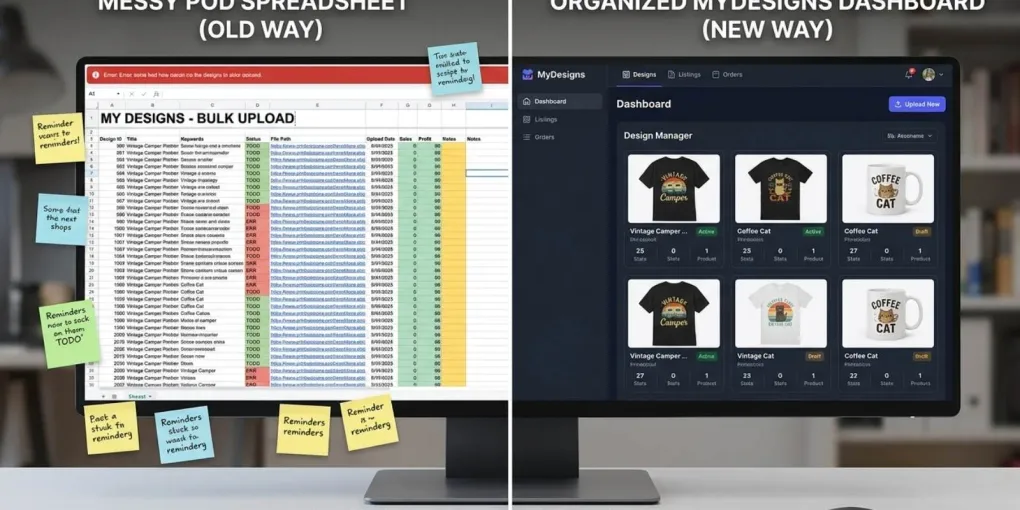
MyDesigns is a cloud platform for building and managing print-on-demand and digital products. Its documentation describes a connected workflow for organizing designs, creating products, rendering mockups, generating listing data, publishing to connected sales channels, syncing later changes, and managing orders.
The useful question is not whether it replaces every tool for every seller. It is whether a central catalog with bulk operations matches the work you need to do. MyDesigns is worth examining when your bottleneck is maintaining product data, mockups, listing information, and updates across a growing set of products or connected shops.
It is not a substitute for checking every print file, variant, marketplace rule, listing claim, or AI-generated suggestion before publication. The platform can centralize and automate parts of a workflow, but the seller remains responsible for the product and listing that go live.
What MyDesigns documents as one workflow
MyDesigns organizes the workflow around several related objects. A design is artwork in your library. A product is a self-contained product instance that includes print files, variants, pricing, mockups, and marketplace metadata. A listing is the channel-specific presentation of a product, with its title, tags, description, and images.
| Area | What the official documentation describes |
|---|---|
| Design library | Upload, organize, tag, search, and manage artwork before it becomes a product. |
| Products | Combine design files with blanks, variants, pricing, print areas, mockups, and marketplace metadata. |
| Mockups | Generate product-preview images as part of the product workflow and use reusable mockup sets. |
| Listing data | Create or edit titles, tags, descriptions, attributes, pricing, and images; apply bulk changes across selected products. |
| Publishing and sync | Publish a product to connected platforms, then push later changes such as title, tags, pricing, or variants to live listings. |
| Orders and fulfillment | Bring orders into a shared view and route production through the selected print-provider setup. |
This structure matters because products are documented as self-contained instances. Once a product has been created, it keeps its own print files, variants, mockups, and values. Reorganizing or deleting the original design does not automatically break a product that was already created.
The operations that can be handled in bulk
MyDesigns’ official documentation presents bulk work as a core part of the platform. The published workflow includes creating products from designs, generating mockups, generating or editing listing data, publishing, synchronizing changes, and modifying selected products in batches.
For a seller, the practical value is consistency. Instead of maintaining separate copies of a title, set of tags, pricing structure, or mockup selection across several product records, you can centralize the source product data and make controlled updates from one place.
That is different from a Photoshop batch plugin. A Photoshop workflow is built around Smart Object PSD templates and exported images. MyDesigns is built around a cloud catalog, product records, mockups, listing data, connected shops, and subsequent synchronization. For a decision between the two architectures, see our BulkMockup vs MyDesigns comparison.
Imported listings need manual review
MyDesigns can import an existing external listing, including from Etsy, and bind it to the platform’s external ID so it can be managed and synced later. This is useful, but it is not a fully automatic reconstruction of a production-ready product.
The product documentation gives two important limitations. First, the external platform does not describe variants in the same way as a print provider, so MyDesigns attempts to map variants and the seller must review the mapping. Second, an import brings in the listing’s mockup images, not the production-ready print files. You need to add those print files manually before relying on the imported product for fulfillment.
| Imported element | What to check before you publish or fulfill |
|---|---|
| Variants | Confirm that sizes, colors, and other variants are mapped correctly to the print-provider product. |
| Print files | Add the production-ready artwork; mockup images alone are not the file sent to production. |
| Listing data | Review title, description, tags, pricing, and channel-specific attributes rather than assuming an import makes them current. |
| Mockups | Verify image selection, order, and variant association before syncing changes back to a live listing. |
This is a control point, not a defect. Any time a listing moves between systems with different data models, the seller should check the output before a live product or order depends on it.
Plans, limits, and AI credits are part of the decision
Avoid selecting a MyDesigns plan from an outdated price comparison. The official plan documentation separates Free, Starter, Pro, and Pro Plus through limits and capabilities such as daily publications, multi-product publications, marketplace publishing allowances, connected shops, storage, mockups, custom mockups, imports, exports, and credits.
The Free account is documented as limited, with no access to several advanced tools including custom mockups, exports, and imports. Paid plans introduce more capability and higher allowances. Before subscribing, identify the operation that will constrain your own workflow first: storage, mockups, daily publication volume, connected shops, imports/exports, or AI credits.
MyDesigns says credits are used mainly for AI-powered actions, including image generation, design variations, and other premium AI actions. Paid plans include a monthly credit allowance. Unused plan credits may roll over for up to three months while the subscription remains active, then expire; extra credit packs can be purchased separately.
Do not treat AI listing data as publish-ready by default. MyDesigns documents tools for producing titles, tags, descriptions, bullet points, and attributes. Review the output for factual accuracy, your brand voice, marketplace restrictions, copyright or trademark issues, and the final product configuration before publishing.
When listing to Redbubble or another marketplace, platform rules are a separate constraint from any tool’s suggestion. For example, our Redbubble tags guide covers the current tag limit and relevance rules that must still be applied to the finished listing.
Channels and fulfillment: verify the active integration
MyDesigns’ public pages name different integrations in different contexts. Its plan documentation currently lists Etsy, Shopify, and WooCommerce as marketplace integrations on paid plans. Its bulk-publishing page names Etsy, Shopify, and TikTok Shops, and says more integrations such as Amazon are coming. This is why a review should not promise that every marketplace is available in every plan or at every point in time.
The same caution applies to fulfillment. MyDesigns documents integrations and print partners, including Printify in its plan comparison and a 240 Express partner page. It also states that MyDesigns does not operate its own factories. Check the currently connected provider, product catalog, base cost, location, and production terms in your account before you publish a product.
If you are considering a MyDesigns-to-Printful workflow, use our MyDesigns to Printful guide as a separate operational reference. Verify the current connection and each product’s configuration before treating an API or sync workflow as ready for production.
Cancellation, renewal, and what remains live
MyDesigns’ Refund and Cancellation Policy says paid subscriptions renew automatically until you cancel. You can cancel renewal from account settings; the cancellation takes effect at the end of the current billing term, and you retain access until then.
For a new paid subscriber who paid upfront, the policy documents a 7-day money-back guarantee. Used credits may be deducted from a refundable amount. Outside that initial guarantee or a legal requirement, the policy says subscription fees are not refundable for partial periods.
Cancellation can also affect what stays live. MyDesigns says active digital-product listings published through its service may be deactivated within 21 days after cancellation or the end of the final billing cycle. A MyDesigns Store remains active and continues to fulfill orders for 30 days after a paid subscription ends; if the subscription is not restored in that window, the Store is unpublished but remains in the account.
Read the current policy before cancelling, especially if you sell digital files or operate a MyDesigns Store. Your connected marketplace listings, provider accounts, and customer obligations may have their own rules in addition to the platform policy.
Who should consider MyDesigns?
MyDesigns is worth investigating if you want one cloud catalog for designs, products, mockups, listing data, publishing, and later synchronization. It is especially relevant when you need repeatable product operations and can make use of the plan’s actual limits, credits, and supported integrations.
It is less suitable as an automatic solution if you need a guarantee that an imported listing is production-ready, expect an AI-generated field to be correct without review, or require a specific marketplace or provider that is not documented for your active plan. In those cases, verify the integration first, test a small non-critical workflow, and check all imported or generated product data before scaling.
For a Photoshop-based batch-mockup workflow with different prerequisites, read our BulkMockup review. The tools can serve different stages of a POD operation, but the right choice depends on your catalog, product data, connected channels, and the controls you need before publication.
Sources
- MyDesigns Documentation — Welcome
- MyDesigns — Listing Management
- MyDesigns Documentation — Products
- MyDesigns Documentation — Subscription Plans
- MyDesigns Documentation — Credits and Usage
- MyDesigns — Bulk Publishing
- MyDesigns Documentation — Print Partners
- MyDesigns — Refund and Cancellation Policy
Frequently asked questions
Does MyDesigns require Photoshop?
No. MyDesigns documents its own cloud tools for designs, products, mockups, listing data, and publishing. You can start with a MyDesigns account without installing Photoshop.
Can I import an existing Etsy listing into MyDesigns?
Yes, but imported listings need manual review. MyDesigns says it attempts to map variants from the external listing, and you must add the production-ready print files because an import brings in mockup images only.
Does MyDesigns publish to every marketplace?
No. Channels and limits depend on the active plan and integrations. Check the current MyDesigns documentation and your account before building a workflow around a specific marketplace.
Do MyDesigns AI tools use credits?
Yes. MyDesigns says credits are used mostly for AI-powered actions. Paid plans include monthly credits, and unused plan credits may roll over for up to three months while the subscription remains active.
Can I cancel MyDesigns at any time?
You can cancel renewal from account settings, but paid subscriptions remain active until the end of the current term. MyDesigns documents separate effects for digital-product listings and MyDesigns Stores after cancellation.
More from this series
Tools mentioned in this guide