Cloud Font Workflow: Move Your Typography Off Local Storage
If you design across more than one device or if you use any automated mockup tool your local font library is already causing problems you may not have noticed yet.
Missing font warnings when opening older project files. Bulk mockup scripts that silently fall back to a system default. Design software that loads slower every month as your local directory grows. These aren’t random bugs. They’re the predictable result of storing typography assets the same way you’d store personal photos.
A cloud font workflow fixes the underlying architecture.
The Three Failure Points of Local Font Storage
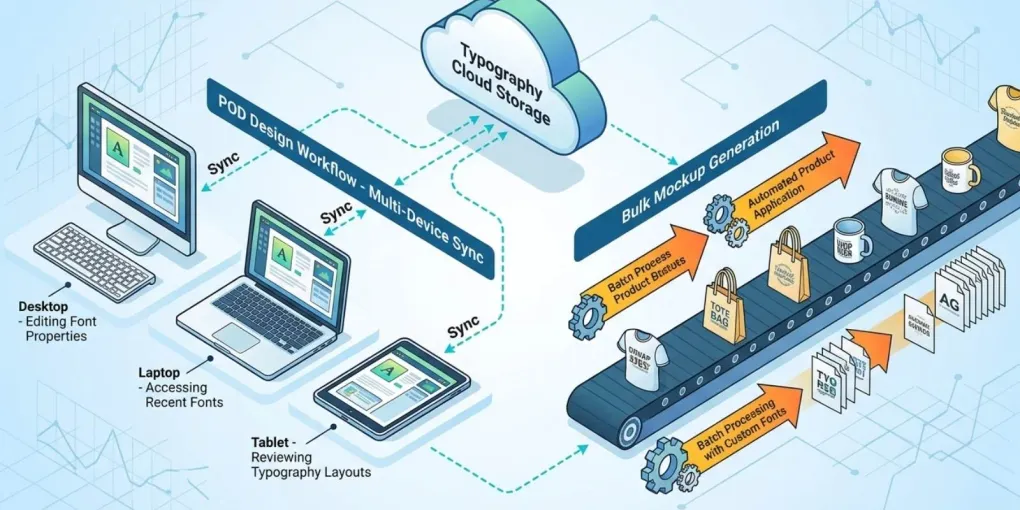
Device fragmentation. When your fonts live on your main workstation, they don’t exist on your laptop or a secondary machine. Opening a design file on a different device produces missing font errors. Fixing them manually one file, one session at a time compounds across a large catalog.
Automation incompatibility. Bulk mockup generators, cloud-based design tools, and server-side rendering pipelines can’t read files on your local hard drive. They require assets accessible via URL or authenticated API. A font installed locally is invisible to every automated tool running outside that machine.
OS performance degradation. Every font installed into your OS adds to the initialization load at startup. Design software reads the full system font list every time it launches. Past a few thousand installed fonts, that overhead becomes measurable and it doesn’t improve on its own.
What a Cloud Font Architecture Looks Like
The principle: your font files live in cloud storage, not on your OS. Applications and automated tools access them from the cloud rather than reading a local directory.
This works at two levels.
Level 1 Synced cloud directory. The simplest version. Font files live in a synced folder Dropbox, Google Drive, or equivalent organized by niche collection. Any device with that sync client installed has access to the full library without local OS installation. You still activate fonts manually through a font manager, but the source files are centralized.
Level 2 Browser-based font management. Tools like Creative Fabrica’s Fontcloud go further. Your downloaded fonts live in a web-accessible database. Any browser session can access and preview your library. Fonts push directly into compatible design tools without local installation at all.
Level 2 is where automation becomes possible.
Integrating Cloud Fonts with Automated Tools
For POD sellers running bulk mockup workflows, the integration point is the asset URL.
When fonts are stored locally, your automation scripts can only access them if they run on the same machine. When stored in a cloud directory with a stable URL structure, any tool with the right credentials can fetch them directly.
Practical examples:
- A bulk t-shirt mockup generator calls a font file via URL, applies it to a text layer, and renders the output no local installation required
- A cloud-based design tool loads your full niche collection without manual activation before the session
- Working on a new device requires no font reinstallation authenticate to your cloud manager and the library is immediately accessible
This is especially relevant for sellers managing multiple niches with distinct visual languages. Switching from a Dark Academia session to a tabletop RPG batch doesn’t require changing your local font activation state.
Migration Steps: Moving From Local to Cloud
1. Audit before you migrate. Run a duplicate scan and remove redundant files first. Migrating 3,000 fonts when 800 are duplicates wastes storage and makes the cloud library harder to navigate.
2. Enforce a clean naming convention. Cloud storage and automated tools handle filenames differently than your OS. Spaces, parentheses, and special characters cause parsing errors. Rename every file to lowercase, hyphenated format: gothic-blackletter-condensed-bold.otf.
3. Mirror your niche structure. If you’ve organized your local library by niche collection in your font manager, replicate that exact folder structure in cloud storage. Consistency means your automation scripts don’t need rewriting when you add new assets.
4. Store license files in the same directory. Every commercial font should have its license file stored alongside the asset. In cloud storage, this also makes license files accessible from any device.
5. Test one automated tool before fully migrating. Confirm that your most critical automation whatever generates your mockups or processes bulk uploads can access and render fonts from the new cloud path before you migrate the entire library.
File Format Priorities for Cloud Storage
OTF preferred. Better metadata, more precise glyph scaling at high resolution, wider compatibility with professional design tools. When your download includes both OTF and TTF, take the OTF.
TTF acceptable. Widely supported, slightly larger file size, occasionally less precise at very high DPI. Use when OTF isn’t available.
WOFF/WOFF2 web only. Optimized for browser rendering. They work in web-based design tools but cause issues in desktop applications or print-resolution rendering pipelines. Don’t use them as your primary archive format.
Variable fonts context-dependent. A single variable font file contains multiple weight and width variations. Space-efficient, but not all automated tools support the full variable axis range. Test before deploying in bulk workflows.
Licensing Stays the Same, Storage Changes
Moving fonts to cloud storage doesn’t change their license terms. A font downloaded under a personal-use license remains personal use whether it’s on your hard drive or in your Dropbox.
For POD commercial work, your cloud library should contain only assets sourced from platforms that issued explicit commercial licenses at download. Creative Fabrica’s freebie program covers this for individual assets every Daily Gift includes the Single Sales License regardless of where you store the file afterward. See the freebies breakdown for what that license covers.
For systematic sourcing of commercial assets at volume, the Creative Fabrica vs Envato Elements comparison covers which catalog better fits POD commercial workflows.
Frequently asked questions
What is a cloud font workflow?
A setup where typography assets are stored in cloud-accessible directories rather than installed locally on your OS. Automated tools access fonts via URL, eliminating device-dependency issues and keeping design software from loading unnecessary files at startup.
Can I use Dropbox or Google Drive as cloud font storage?
Yes, for the synced directory approach. Both provide stable file paths that can be referenced by local font managers. For true browser-based access without local installation, purpose-built tools like Creative Fabrica's Fontcloud go further.
Does moving fonts to the cloud affect their license?
No. License terms are determined at download by the source platform, not by where you store the files afterward. Commercial licenses remain valid in cloud storage.
Do automated mockup tools support cloud-hosted fonts?
Depends on the tool. Cloud-based mockup generators that accept asset URLs support this natively. Desktop-based automation scripts running locally may still require the font to be accessible on the local machine or network path.
What font format should I use for cloud storage and POD?
OTF when available. Better metadata, cleaner scaling at high resolution. Avoid WOFF and WOFF2 as your primary archive format they are optimized for browser rendering, not print-resolution pipelines.
More from this series