Etsy Listing Image QA for BulkMockup Workflows: A 2026 Checklist
When a BulkMockup workflow produces dozens of Etsy listing images, the safest way to preserve quality is to add a separate image QA pass before publishing. Check the supported file type, dimensions, sRGB colour, thumbnail crop, product-variant mapping and the image description for a representative sample—and check the first listing image for every new template. This is an operational checklist, not a claim about a hidden Etsy ranking formula.
Etsy publishes useful image and accessibility guidance, but it does not publish evidence for a ranking penalty caused by a supposed Computer Vision comparison between alt text and pixels. It also does not state that every listing image must be exactly 3,000 × 3,000 pixels or fall within a fixed 1–5 MB range. A defensible bulk workflow should follow the requirements Etsy actually documents, then validate the files your own template creates.
Separate Listing-Image QA From Print-File QA
A production artwork file and an Etsy listing image serve different purposes. The print file must meet the requirements of the fulfilment provider; the listing image must present the product clearly in Etsy’s search and product views. Keep those two exports in separate folders and track them with a shared asset ID. If your design library is not yet structured this way, start with a POD digital asset organisation workflow before adding more automation.
For a batch, record the design ID, product and colour variant, mockup template, final image filename, Etsy listing reference and QA status in one source of truth. This makes it possible to identify a wrong colourway or an outdated mockup template without manually inspecting every live listing.
| QA field | What to verify | Why it matters |
|---|---|---|
| Asset-to-variant map | The garment colour, product and design match the intended listing variant | Prevents an operational mismatch during batch publication |
| File output | The export uses an Etsy-supported image format and has the intended dimensions | Avoids discovering incompatible exports after the batch is ready |
| Colour | The file is prepared in sRGB when colour accuracy is important | Helps avoid an unexpected colour appearance after Etsy processing |
| First image crop | The product remains clear in Etsy’s thumbnail preview | The first image is the visual entry point to the listing |
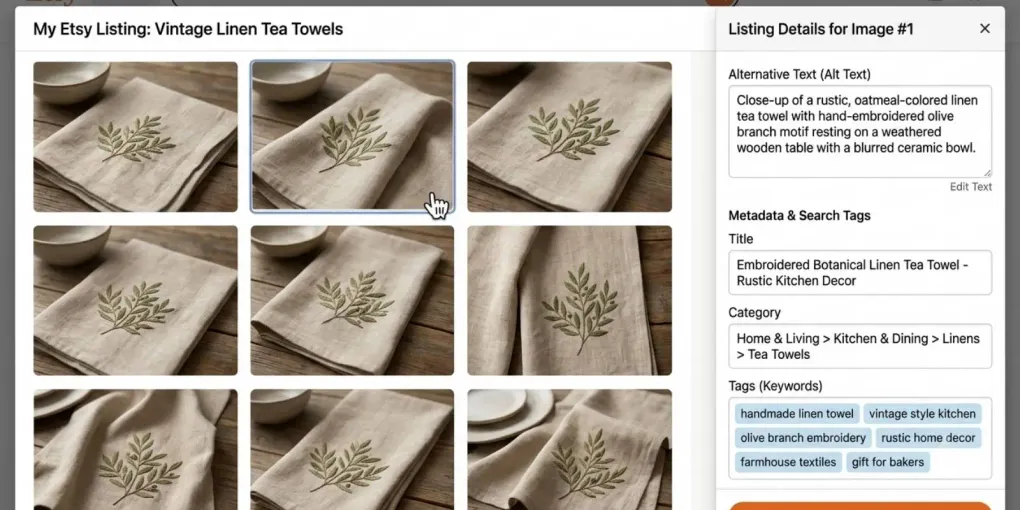
| Image description | The alt text describes this particular view, detail or variation | Supports buyers using assistive technology and keeps the content useful |
Use Etsy’s Published Image Requirements as the Baseline
Etsy accepts .jpg, .gif, .png, .svg and .heic image files. It recommends listing images at least 2,000 pixels wide and high. For the first listing image, Etsy specifies at least 635 pixels in both dimensions to avoid lower visibility in search. Its help centre also notes that images larger than 1 MB can take longer to upload on a slow connection; this is a practical upload consideration, not a universal target file size. Etsy’s image requirements and best practices are the reference to check when its guidance changes.
If a mockup renders in an unexpected colour on Etsy, convert the file to sRGB before upload. Etsy says it converts images to the sRGB profile, while CMYK is intended for print. For a new BulkMockup template, export a small test set first: inspect dimensions and colour in the exported files, then confirm the presentation once uploaded before relying on the template for a larger collection.
Design the First Image for the Thumbnail, Not Only for the Full Mockup
Etsy recommends a horizontal or square first listing image so that its central focal point is preserved in cropped thumbnail views. Use Etsy’s thumbnail adjustment and preview rather than assuming that a full-size mockup will crop well automatically. A hoodie design that looks balanced in a landscape Photoshop canvas can still lose its focal point if the preview crops too close to the edges.
This is an editorial and merchandising check, not proof that one mockup style will always convert better than another. Keep a product-forward mockup as the first image when it communicates the item most clearly, then use additional images for fit, scale, colour choices, details or lifestyle context. The right sequence depends on what a buyer needs to understand before purchasing.
Write Alt Text for the Image, Not for Keyword Repetition
On Etsy, alt text is an image description for buyers who cannot see the listing photos. If the shop’s default language is English, sellers can add a description for each image. Etsy recommends describing the item’s visible details, texture and scale concisely, with a limit of 250 characters. It is particularly useful to describe different views, details and variations rather than applying the same sentence to every photo.
For a bulk mockup set, write the description after the visual export has been checked. A workable pattern is: product or view + visible colour + design or material detail + relevant scale or context. For example: “Charcoal hoodie mockup shown front-on, with a small cream gothic-library illustration centred on the chest.” The point is not to force a keyword into every field; it is to describe what is actually visible in that variation.
Etsy states that repeating your shop name, listing title, description, tags or SKU in alt text does not provide an additional SEO benefit. Its guidance says that image descriptions may also be read by search engines outside Etsy, but that is not a promise of rankings. See Etsy’s official alt-text instructions for the current feature availability and editing steps.
Treat AI-Generated Alt Text as a Draft You Can Review
Etsy may add AI-generated text alternatives to listing images from US sellers when the seller has not provided one. Seller-written text is not altered, and text generated by Etsy can be edited. This can be useful as a starting point, but a batch workflow should not assume that any automated description has captured the correct colour, variant or product detail.
Review the description against the image you actually uploaded. If the listing has a size chart, Etsy recommends describing the chart in as much detail as possible or including the information in the listing description. That check is especially important when one automated template is reused across several garment types.
A Five-Point QA Pass Before Publishing a Batch
Do this after rendering the images and before you consider the batch complete. The first three checks are taken directly from Etsy’s published guidance; the remaining two are workflow controls that make errors easier to isolate at scale.
- Export check: Confirm a supported image type, the expected dimensions and sRGB where colour fidelity is needed.
- Thumbnail check: Review the first image of every template in Etsy’s crop preview; make sure the product and key design remain legible.
- Accessibility check: Add or revise concise alt text for different views, colours and details, instead of repeating sales copy or SKUs.
- Variant check: Compare the asset ID, garment colour and design against the listing variant before publishing.
- Rollout check: When a template is new or changed, publish a small controlled set first and document any correction before processing the rest of the batch. This is an internal risk-control practice, not an Etsy requirement.
The rendering process itself is covered in our BulkMockup automation guide. Keep the output process and the Etsy QA process separate: automation creates repeatable files; the QA pass confirms that those files are ready for a buyer-facing marketplace.
The Practical Limitation
No image checklist can guarantee visibility or sales. Etsy’s own SEO guidance explains that no one can promise a top search result, and listing performance depends on more than a photo field. The purpose of this workflow is narrower and more useful: reduce avoidable image, crop, accessibility and variant-mapping errors before they are copied across a large catalog. Once the basics are consistent, review the listing as a whole—title, description, images and video—using Etsy’s official SEO overview.
Frequently asked questions
What image size should I export for Etsy listings?
Etsy recommends listing images at least 2,000 pixels wide and high. Its first listing image should be at least 635 pixels wide and high to avoid lower visibility in search. There is no official requirement in Etsy’s guidance to export every image at exactly 3,000 by 3,000 pixels.
Does alt text improve Etsy listing ranking?
Alt text primarily makes listing images accessible to buyers who cannot see them. Etsy says that repeating the shop name, listing title, description, tags or SKUs in alt text does not provide an additional SEO benefit. Search engines outside Etsy may read the image descriptions, but no ranking result is guaranteed.
Can Etsy add alt text automatically?
Etsy may add AI-generated alt text to US sellers’ listing images when no text alternative has been provided. Seller-written alt text is not altered, and alt text added by Etsy can be edited.
How should I quality-check a batch of generated mockups?
Before publication, verify a representative sample and the first image of every template for the supported file format, dimensions, sRGB colour, thumbnail crop, correct product variant and an accurate image description. Use a separate asset-to-listing checklist so that each correction is traceable.
More from this series
Tools mentioned in this guide