How to Cancel a Creative Fabrica Subscription (2026)
Last checked: 20 August 2026. This guide is a documentary analysis of Creative Fabrica’s published help pages, Subscription Agreement v1.2, and Subscription License v1.6. It is not legal advice; check the current license for the specific asset and your own use case.
How to cancel Creative Fabrica
To cancel an active or on-hold subscription, Creative Fabrica currently directs users through the following path:
- Sign in to your Creative Fabrica account.
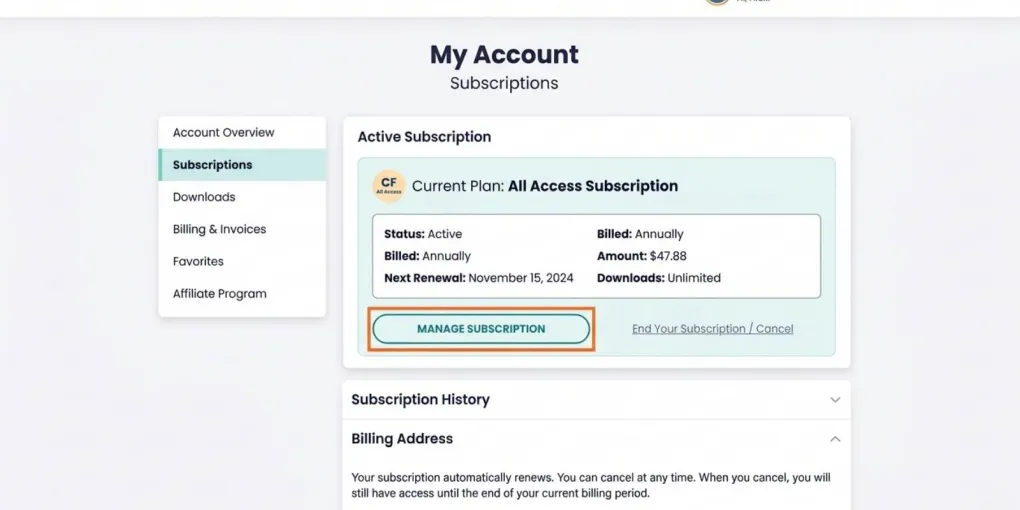
- Open My Account → Subscriptions.
- Select Manage my subscription.
- Select End your subscription.
- Answer the confirmation questions shown by Creative Fabrica.
- Select Next to reach the confirmation page.
- Select End Subscription to finalize the cancellation.
After this process, Creative Fabrica says your billing schedule updates so that the subscription does not renew. Save the confirmation and check the subscription status in your account before assuming the request is complete.
If the subscription status is activating, Creative Fabrica’s help center instructs you to contact its support team rather than follow the normal cancellation flow.
What changes after you request cancellation
Creative Fabrica’s subscription page says that you keep access until the end of the prepaid period, then lose access to new downloads and updates. Its current Subscription Agreement adds an important condition: if you use the service, download assets, or use tools after requesting cancellation, the subscription can automatically reactivate and automatic billing can resume.
For that reason, treat the period after a cancellation request carefully. Check your account confirmation, avoid new downloads or tool use unless you intend to reactivate, and keep a record of the assets and products you created while the subscription was active.
You can reverse a cancellation through the Undo Cancellation option shown in the account, according to Creative Fabrica’s cancellation instructions. Do this only if you intend to continue the subscription.
Billing, renewal and refunds
Creative Fabrica’s current Subscription Agreement states that subscriptions renew automatically until they are cancelled. It also states that payments are non-refundable except where required by law, with no refund or credit for unused services or part of a subscription period.
This is a policy summary, not a guarantee for every jurisdiction or payment issue. If the account status or an invoice does not match what you expected, review the invoice, the Subscription Agreement version in force for your purchase, and contact Creative Fabrica support before taking further action.
What happens to your downloads and POD listings
The outcome depends on the type of asset and the way it is used. The table below summarizes Creative Fabrica’s published rules; it does not replace the license attached to a particular download.
| Asset or use case | After the subscription ends | Practical POD action |
|---|---|---|
| Fonts, Graphics, PNGs and Bundles | You may keep selling products created while the subscription was active. You may not create new designs intended for sale with those subscription assets after the subscription ends. | Keep a dated record of the design, asset and listing. Do not create new commercial variants with the subscription asset after the end date. |
| Full POD downloads | Creative Fabrica says Full POD licenses obtained through a subscription become Basic POD after the subscription ends. | Review each listing. Remove items that do not meet the current Basic POD conditions or modify them only where the license permits. |
| Crafts | Creative Fabrica says Crafts downloaded with a subscription have a lifetime commercial license and may be used for new designs after cancellation. | Confirm that the download is actually categorized as a Craft and retain its license record. |
| Daily Gifts | Creative Fabrica says Daily Gifts are available for 24 hours and, once downloaded, may be used commercially forever under their applicable license. | Save the download and its license key in your account; review the asset’s current license before a new commercial use. |
For Fonts and Graphics, “I still have the file” is not the relevant test. The relevant question is whether the item you are selling was created while the subscription was active. A simple asset register can help record the download, the design date, the license and the marketplace listing. See our digital asset organization guide for a practical record structure.
Full POD needs its own review
Full POD is the exception most likely to require action after cancellation. Creative Fabrica’s published policy says the Full POD status falls back to Basic POD when an All Access subscription ends. Basic POD has different conditions, including a requirement for distinctive new design elements for graphics and crafts. Do not rely on the old Full POD status without reviewing the current license text and the actual listing.
If a listing uses a font, remember that fonts have their own permitted POD uses and restrictions. Our Creative Fabrica Fonts and Printful guide explains the operational checks, but the current Creative Fabrica license remains the source that governs the asset.
A cancellation checklist for POD sellers
Before or immediately after requesting cancellation, use this short review:
- Save the cancellation confirmation and note the end of your prepaid period.
- Export or record each asset’s license key, download date and source page.
- List active POD products that use subscription assets.
- Identify any listing using a Full POD download and test it against the current Basic POD rules.
- Separate Crafts and Daily Gifts from ordinary Fonts/Graphics; their published post-cancellation rules differ.
- Avoid new subscription downloads, new tool use, or new commercial designs with subscription Fonts/Graphics unless you intend to reactivate or renew.
For Daily Gifts and other free downloads, read the Creative Fabrica freebies guide alongside the license shown for the asset. Availability and licenses are not a reason to assume every free file has identical conditions forever.
Sources
- Creative Fabrica Help — How do I cancel my subscription?
- Creative Fabrica — Subscription Agreement v1.2, valid from 15 June 2026
- Creative Fabrica Help — Can I keep using files after I cancel All Access?
- Creative Fabrica — Subscription License v1.6, valid since 10 April 2026
- Creative Fabrica — Daily Gifts
Frequently asked questions
Can I cancel Creative Fabrica at any time?
Creative Fabrica’s current Subscription Agreement says you can cancel at any time from My Account settings. If a subscription shows as activating, Creative Fabrica asks users to contact its support team instead.
Will my subscription renew after I cancel?
Creative Fabrica says the billing schedule updates after cancellation so the subscription does not renew. Check the confirmation in your account. Its Subscription Agreement also says that using the service, downloading assets, or using tools after a cancellation request can reactivate the subscription.
Can I keep selling designs made with subscription downloads?
For Fonts and Graphics, Creative Fabrica says you can keep selling products created while the subscription was active, but cannot create new commercial designs with those subscription assets after it ends.
What happens to Full POD downloads after cancellation?
Creative Fabrica says Full POD licenses obtained through a subscription downgrade to Basic POD after the subscription ends. Items that do not meet Basic POD requirements must be removed from POD stores.
Are unused subscription periods refundable?
Creative Fabrica’s current Subscription Agreement says payments are non-refundable except where required by law and that it does not provide refunds or credits for unused services or partial subscription periods.
More from this series
Tools mentioned in this guide