Pinterest Analytics for POD: Metrics That Actually Matter
Most POD sellers on Pinterest are flying blind. They pin consistently, they follow the SEO checklists, and then they open their analytics dashboard once a month, scroll past a wall of numbers, and close the tab no wiser than before. The problem isn’t a lack of data. Pinterest actually gives you more analytics than almost any other platform for a small seller. The problem is that most of those numbers don’t tell you anything about whether you’re going to make a sale.
Which Pinterest Metrics Drive POD Sales
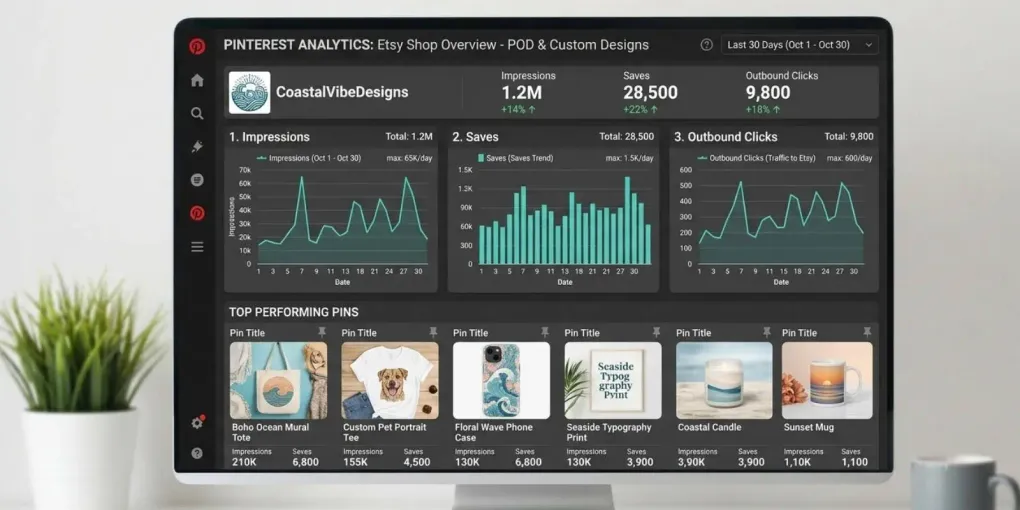
Pinterest’s dashboard surfaces five core metrics on every pin: impressions, saves, pin clicks, follows, and outbound clicks. Only one of those has a direct line to your Etsy revenue.
Outbound clicks measure someone leaving Pinterest to land on your listing. That’s the closest thing Pinterest gives you to actual traffic, and it’s the number worth anchoring your strategy around. Everything else is a supporting signal, not a result.
Saves tell you something different: whether a pin has staying power. A pin that gets saved keeps circulating on other people’s boards long after you posted it, which is exactly the “long shelf life” effect that makes Pinterest worth the effort in the first place. High saves with low outbound clicks usually means the image is doing its job but the destination isn’t closing the deal — check your listing photos and pricing before you touch the pin design again.
Impressions are the vaguest of the bunch. A pin can rack up thousands of impressions purely because it landed in a trending search, with zero relationship to how many people actually wanted to click through. Treat impressions as a reach indicator, not a performance indicator, and resist the urge to declare a pin “successful” based on this number alone.
Pin clicks and follows matter least for a POD shop specifically. Pin clicks just open the pin in Pinterest’s own lightbox — the person hasn’t left the platform yet. Follows are a vanity metric for most sellers; Pinterest, unlike Instagram, sends most of its traffic through search and browsing rather than a followed feed, so growing a follower count doesn’t move the needle on sales the way it might on other platforms.
Setting Up Pinterest Analytics for Etsy
Before any of this data is useful, you need two things in place: a Pinterest business account, and a claimed website. If you’re pinning from a personal account, switch first — Pinterest’s own analytics documentation walks through the conversion, and it takes a few minutes.
Claiming your Etsy shop URL is the step people skip, and it’s the one that actually matters. Under Pinterest’s account settings, you can claim a website or a specific profile. Once claimed, any pin created from your listings — including ones made by other people repinning your product photos — rolls into your account-level analytics automatically. Skip this step and you’re only seeing performance for pins you personally uploaded, which massively understates your real reach if your designs get organically repinned.
If you’ve built out a content routine already, this pairs naturally with the workflow covered in Pinterest SEO & AI Mockups — Rich Pins in particular feed cleaner data back into analytics, since Pinterest can match the pin to product metadata rather than guessing from the image alone.
Reading the Data: Impressions vs Saves vs Clicks
The dashboard itself groups these three numbers together, which subtly encourages sellers to treat them as equally important. They’re not, and reading them in the wrong order leads to bad decisions.
Start with outbound clicks and work backward. If a pin has strong outbound clicks, look at what it has in common with your other high-performers — board placement, pin description keywords, time of posting — and try to repeat that pattern. If a pin has high saves but weak outbound clicks, the image is winning but the offer isn’t; that’s a listing problem, not a Pinterest problem, and no amount of pin redesign will fix it. If a pin has high impressions but low saves and low clicks, it’s getting shown but not resonating — usually a sign the image doesn’t stand out in the feed, or the keyword match pulled in the wrong audience.
This is also where a lot of sellers over-read short timeframes. A single day of low outbound clicks on an otherwise solid pin is normal variance, not a signal to panic. Pinterest content builds momentum slowly; judging a pin’s real performance usually needs at least two to three weeks of data, which lines up with the platform’s algorithm behavior around fresh versus evergreen pins.
Identifying Top-Performing Pin Formats
Once you have a few months of data, the dashboard’s “Top Pins” view — sortable by impressions, saves, pin clicks, or outbound clicks — becomes genuinely useful for spotting format patterns rather than just single winners.
Look specifically for what repeats across your outbound-click leaders: is it lifestyle-style mockups over flat lays? Text overlay versus none? A specific color palette? POD sellers who’ve done the lifestyle mockup comparison tend to see this show up clearly in Pinterest data too — pins that show the product in context typically outperform flat product shots on outbound clicks, even when flat lays win on saves.
Video pins are worth a separate look if you’re using them, since Pinterest’s dashboard tracks watch time and average watch time on top of the standard metrics. A video with strong saves but a short average watch time is being judged mostly on its cover image, not its content — which tells you the thumbnail is doing the heavy lifting either way.
Using Analytics to Refine Your Content Calendar
Analytics only pay off if they change what you pin next, not just what you look at. Once you’ve identified your top-performing formats and boards, the practical move is to weight your upcoming content calendar toward more of what’s already converting, rather than spreading effort evenly across every product line.
That doesn’t mean abandoning underperforming boards entirely — a board with lower average engagement might just be newer, or serving a smaller niche within your catalog. Give a new board a reasonable runway (a few weeks of consistent pinning) before judging it against boards that have been active for months.
The same logic applies to timing. Pinterest’s own guidance and third-party tracking tools generally agree that consistency matters more than any single “best time to post” — a steady weekly cadence of a few pins per board outperforms sporadic bursts, mirroring what most POD sellers already learn the hard way about publishing schedules in general.
When to Pivot: Reading the Signals
Not every underperforming pin deserves your attention, but a few patterns are worth acting on.
If a whole board is consistently underperforming relative to your account average — not just one pin, but the trend across dozens of pins over a couple of months — that’s a signal the board’s theme or the products behind it aren’t resonating with the Pinterest audience, independent of your pin design skill. That’s a different fix than a design tweak; it might mean retiring the board or repositioning what you’re pinning to it.
If outbound clicks are healthy but your Etsy conversion rate on that traffic is weak, the problem has left Pinterest entirely — it’s now a listing page problem, and no analytics dashboard on Pinterest’s side will fix it. Cross-check against your Etsy shop stats before concluding Pinterest strategy is the issue.
And if you see a sudden, unexplained spike in impressions with no corresponding rise in saves or clicks, resist reading too much into it before it’s had time to settle. Spikes tied to a single trending search term tend to be short-lived, and reacting to them by overhauling a working strategy usually causes more damage than the spike itself.
Conclusion
Pinterest gives POD sellers more data than most small shops know what to do with, but most of that data is noise dressed up as insight. The fix isn’t checking analytics more often — it’s checking the right three numbers, in the right order: outbound clicks first, saves second, impressions last. Set up your claimed account, give new content enough runway to be judged fairly, and let the patterns in your top-performing pins — not a single day’s numbers — decide what you pin next.
Frequently asked questions
What Pinterest metrics should POD sellers track?
Focus on outbound clicks first, since that is the metric closest to actual Etsy traffic. Saves come second, as a signal of long-term pin value, and impressions last, since they measure reach without telling you anything about buying intent.
How do I connect Pinterest Analytics to my Etsy shop?
Switch to a Pinterest business account, then claim your Etsy shop URL under Settings > Claim. Once claimed, every pin created from your listings automatically rolls up into your account-level analytics.
What is a good save rate for product pins?
There is no universal benchmark you can copy from someone else's account, since save rate depends heavily on niche and board size. What matters is your own trend over time: compare each new pin against your account's own rolling average rather than a number pulled from a blog post.
How often should I check my Pinterest analytics?
Weekly is enough for most POD shops. Pinterest's shelf life is measured in months, so daily checks mostly show noise. A weekly review lets you spot real shifts in outbound clicks without overreacting to a single slow day.
More from this series