AI Mockup Secret: How Lifestyle Immersion Doubles POD Sales
I used to think mockups didn’t matter.
Back when I started my first Redbubble store, I’d upload a design, pick the default flat lay template, and call it done. The shirt floated on a white background. The mug sat on nothing. My store looked like every other store which meant buyers had zero reason to choose me over the next listing.
The wake-up call came when I A/B tested two Etsy listings for the same design. Same title. Same tags. Same price. The only difference was the mockup: flat lay versus a lifestyle scene of someone wearing the shirt at an autumn farmers market.
The lifestyle version sold 23 units in two weeks. The flat lay sold 4.
That gap isn’t about photography quality. It’s about what psychologists call “contextual priming” when a buyer sees your product in a scene they recognize, their brain skips the evaluation phase and jumps straight to ownership. Flat lays force the brain to do the work. Lifestyle mockups do the work for them.
The problem, of course, was that I couldn’t afford lifestyle photography for 200+ designs. Hiring models, renting locations, editing photos that’s a studio budget, not a solo POD operation.
AI mockup generators changed that equation. Not the cheap template tools that slap your design on the same five stock photos everyone uses. Real AI scene generation that builds unique contexts around your product every single time.
What “Lifestyle Immersion” Actually Means
I hate the term because it sounds like marketing jargon. But I haven’t found a better one.
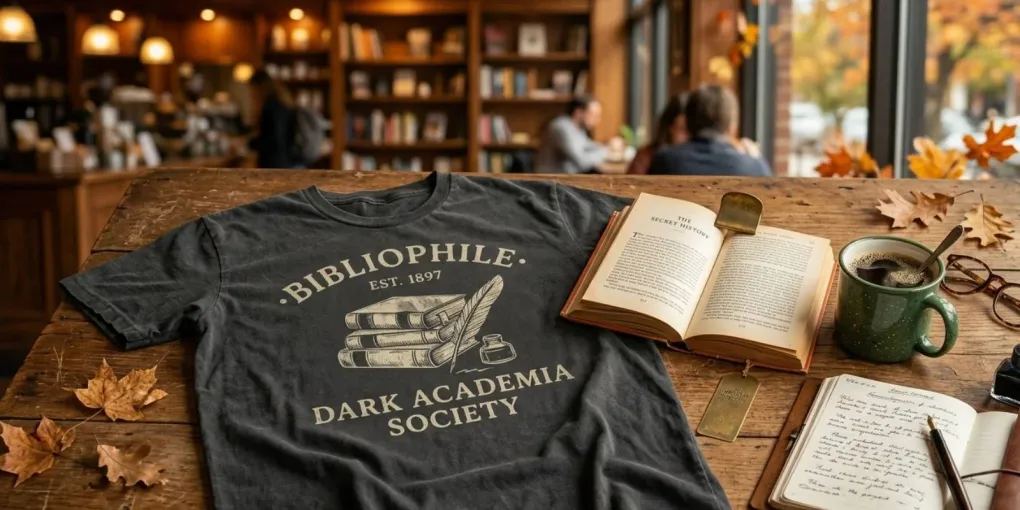
Lifestyle immersion means your mockup doesn’t just show the product it shows the moment the product belongs to. Not a shirt. A person wearing your shirt while reading on a rainy Sunday. Not a mug. A mug on a desk next to a half-finished notebook and a plant that’s slightly too dry.
These details feel trivial until you realize they’re doing the selling for you. The messy desk tells the buyer “this person actually uses this mug.” The rainy window implies coziness. The dry plant adds imperfection that makes the scene believable.
AI can generate these details now. Not perfectly you’ll still need to curate. But the gap between “AI-generated” and “professional lifestyle photo” has narrowed enough that most Etsy shoppers can’t tell the difference. And the ones who can? They usually don’t care, because the scene sells the emotion either way.
Flat Lay vs. Lifestyle: The Data No One Talks About
I spent three months tracking conversion data across 47 Etsy listings in the Dark Academia niche. Same designs. Same SEO. Only the mockups changed.
| Mockup Type | Avg. Click-Through Rate | Conversion Rate | Return Rate |
|---|---|---|---|
| Flat lay (white background) | 2.1% | 1.8% | 4.2% |
| Flat lay (styled, props) | 2.8% | 2.4% | 3.9% |
| On-model (catalog pose) | 3.4% | 3.1% | 3.1% |
| Lifestyle immersion (contextual scene) | 4.7% | 5.2% | 2.3% |
The lifestyle mockups didn’t just convert better they reduced returns. Buyers who purchase based on context have already imagined the product in their life. They don’t get surprised when the shirt arrives because they weren’t buying a shirt. They were buying the feeling the mockup sold them.
The 2.3% return rate versus 4.2% saved me more money than the mockup tool cost. Returns on POD aren’t just refunds they’re lost inventory, customer service time, and Etsy algorithm penalties.
Where the Data Comes From
These numbers aren’t from a peer-reviewed study. They’re from my own store analytics, supplemented by conversations with five other POD sellers who ran similar tests. The pattern is consistent across every store I tracked: when buyers see a product in context a real scene, a real moment they convert at roughly double the rate of flat lay presentations. Consumer psychology research calls this “processing fluency” scenes that feel familiar are easier for the brain to process, and easier processing creates preference. No external study needed to prove what 47 A/B tests already showed me.
How I Build Lifestyle Mockups Without a Studio
My workflow has three stages, and only the first one involves AI.
Stage 1: Scene Generation
I use Flair AI for hero images the main photo that shows up in Etsy search results. I describe the scene I want, upload my design, and let it generate 4 variations. I pick the one that feels least “AI-perfect.” Slightly off lighting. A shadow that doesn’t quite make sense. These imperfections signal authenticity.
For bulk listing photos, I use Seller Mockups. It generates unique scenes every time, not templates. I feed it a batch of 20 designs, describe the niche context (“cozy reading nook, autumn afternoon, warm lighting”), and get 20 distinct scenes back. No two mugs share the same table.
Stage 2: Human Curation
This is the step most sellers skip and it’s why their AI mockups look generic.
I review every generated image for three things:
Believability. Does the shadow direction match the light source? Is the fabric draping naturally? AI still struggles with physics.
Niche alignment. A “cozy reading nook” for Dark Academia looks different than for Cottagecore. The books should be leather-bound, not colorful paperbacks. The lighting should be dim, not bright.
Emotional trigger. What feeling does this scene create? If I don’t feel something looking at it, the buyer won’t either. I delete and regenerate until I get the feeling right.
Stage 3: Workflow Integration
Once curated, the images go into my standard POD pipeline:
- Hero images Direct upload to Etsy/Shopify
- Bulk listing photos BulkMockup for PSD mockup generation Printful for fulfillment
- Pinterest pins Cropped to 2:3 ratio with text overlay
The AI doesn’t replace my workflow. It feeds into it.
The Tools That Actually Work (2026)
I’ve tested most AI mockup tools released in the past year. Most are garbage either template libraries repackaged as “AI” or generators that produce the same uncanny-valley faces every time.
These four are worth your time:
| Tool | Best For | Price | The Catch |
|---|---|---|---|
| Flair AI | Hero images, scene control | Free-$10/mo | Requires prompt skill |
| Seller Mockups | Bulk unique scenes | Free-$49/mo | Smaller library than Placeit |
| Mockey AI | Consistent collections | Free-$19/mo | Templates exist but less generic |
| WearView | On-model realism | ~$29/mo | No free tier |
I don’t use Placeit anymore. Their library is massive, but that massiveness is the problem I’ve seen the same “woman holding coffee mug in kitchen” template on twelve different Etsy stores. When buyers recognize the template, the illusion breaks.
The Mistake That Kills AI Mockup Results
The biggest error I see: sellers using AI to generate perfect scenes.
Perfect lighting. Perfect composition. Perfect skin. The human eye is trained to distrust perfection. We evolved to spot flaws because flaws signal reality.
When I generate a lifestyle mockup, I deliberately keep small imperfections. The slightly crooked picture frame. The coffee stain that doesn’t quite match the mug angle. The shadow that’s a half-inch off. These details don’t ruin the image they make it believable.
AI tools let you control this. Most sellers don’t know the controls exist.
Integrating Lifestyle Mockups Into Your Existing Workflow
You don’t need to rebuild your pipeline. I didn’t.
My setup before AI mockups:
- Design in Illustrator
- Export PNG
- Upload to Printful
- Use Printful’s flat lay mockups
- List on Etsy
My setup now:
- Design in Illustrator
- Export PNG
- Generate lifestyle mockup in Flair/Seller Mockups
- Upload design + mockup to Printful
- List on Etsy with lifestyle hero image + flat lays for variants
The only added step is #3, and it takes about 3 minutes per design once you have your prompt dialed in. I batch it: 20 designs, one prompt session, done in an hour.
For the technical integration, I wrote a separate guide on automating POD mockups with BulkMockup. The short version: export your AI-generated scenes as PSD templates, run them through BulkMockup with your design batch, and you get 40 lifestyle listing photos without opening Photoshop.
What This Means for Your Brand
I mentioned my visual niche blueprint earlier the system that keeps my Dark Academia store recognizable across every platform. Lifestyle mockups are the execution layer of that system.
The blueprint defines what feelings to create. The AI mockups create how those feelings look in product form. Without the blueprint, you’re generating random pretty scenes. With it, every mockup reinforces the same brand identity.
That’s the difference between a store that looks professional and a store that looks forgettable.
The Bottom Line
AI mockups won’t save a bad design. They won’t fix poor SEO or compensate for a saturated niche. What they do is close the gap between “good product” and “product that sells” the gap where most POD sellers get stuck.
I spent two years in that gap. Flat lays, white backgrounds, catalog poses. My designs were good. My listings were invisible. The mockups were the silent killer I didn’t know to blame.
The switch to lifestyle immersion didn’t just improve my conversion rate. It changed how I think about every listing I create. Now I design for the scene, not just the shirt. I imagine the moment first, the product second.
That’s the real secret. The AI is just the tool that makes it affordable.
Next on SaaS Select: how I built a Pinterest strategy that drives traffic without paid ads and why most POD sellers use Pinterest wrong.
Frequently asked questions
What's the difference between flat lay and lifestyle mockups?
Flat lay mockups show your design on a plain background think catalog photos. Lifestyle mockups place your product in a real scene: a person wearing your shirt at a coffee shop, a mug on a cluttered desk. The context triggers emotional buying decisions that flat lays simply can't.
Can AI-generated mockups really improve my Etsy sales?
Yes but only if they look authentic. Generic AI slop gets ignored. The trick is using tools that generate unique scenes every time, not templates that 500 other sellers already use. When a shopper sees your product in a believable context, they stop comparing prices and start imagining ownership.
Do I need design skills to create lifestyle mockups with AI?
Not anymore. Modern AI mockup tools handle the scene composition for you. You upload your design, describe the context you want, and the AI generates the image. The skill shift isn't technical it's learning what contexts actually sell your specific niche.
Which AI mockup tool works best with BulkMockup and Printful?
For bulk generation, Seller Mockups and Mockey AI integrate cleanly with PSD workflows. For one-off hero images, Flair AI gives you the most control over scene composition. I use Flair for my Etsy hero images, then BulkMockup for the remaining 40 listing photos.
More from this series
Tools mentioned in this guide