Print on demand fulfillment delays UK triage plan
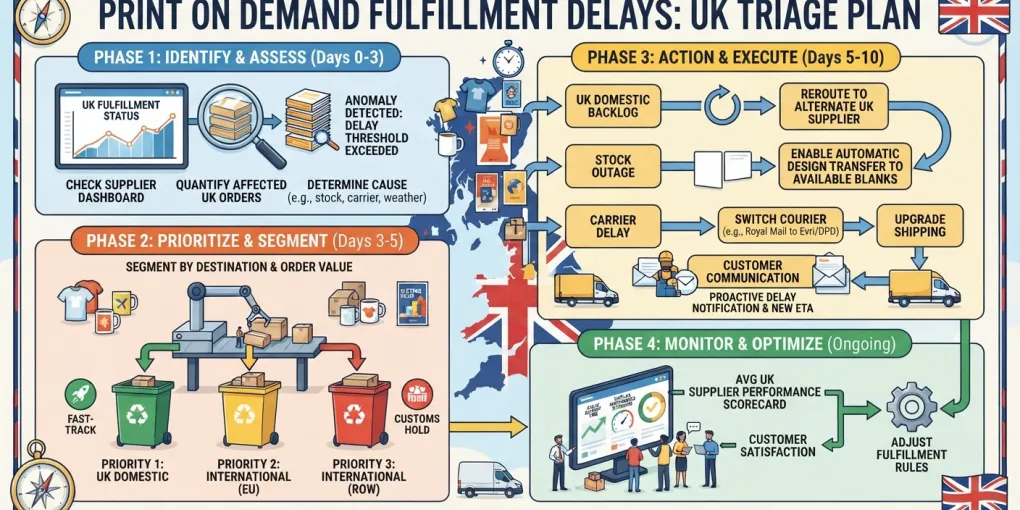
A UK print-on-demand order that misses its promised window creates two jobs at once. The customer needs a clear next step, and the seller needs to know whether the fault is production, dispatch, transit, or an internal order-file error. This guide uses a five-checkpoint triage plan for UK sellers: map the order state, check the provider and order file, write the first customer update, choose the remedy, then pause only the failing listing or route. It is a research and documentation review, not a hands-on provider delay test. The delay question comes first; tool choices come later.
Map the order state before you reply
Start with the order record. Pull order date, promised dispatch or delivery window, SKU, provider route, and current tracking status. Then place the order in one state: production delay, dispatch delay, transit delay, or tracking gap. Each state needs a different customer message. A tracking gap is not the same as a lost parcel.
What to record in the delay log
- Order ID, product, provider, order date, promised window, first delay date, customer update dates, and final resolution.
- The same fields for every order.
- One cause column: file error, address error, production hold, dispatch late, transit late, or tracking gap.
The log is the difference between a complaint and a pattern. A single late order is a service task. A repeated delay on the same product or route is the review trigger before you take more orders on that route. Use the log to see whether the repeat cause is seller-side, provider-side, or transit-side.
UK customer promise check
Match the wording the UK customer saw at checkout before you call the order late. Use the listing or marketplace promise for the customer-facing message. Do not import US carrier or state-level assumptions into a UK order. The Etsy print-on-demand rules guide covers seller-side rules for Etsy orders.
Check the provider and the order file
Check the provider dashboard, order status, and public status page before you send a new delivery date. Record whether the order reached production, the file passed, the address is valid, and the selected product is on hold. Compare provider timestamps with your store timestamps. A missing webhook or a manual order that never reached the provider can look like a provider delay.
Provider-side checks
Look for production hold, stock issue, failed file, or address flag. Keep a screenshot and timestamp in the order record. Name the failure mode in the log. “Delayed” is not a cause.
Seller-side checks
Check listing delivery settings, shipping profile, product variant, and order routing. Fix the seller-side error before you contact the customer with a provider excuse. prints.uk’s common-mistakes guide names mismanaged inventory and fulfilment process mistakes among the errors new print-on-demand sellers make (prints.uk, checked 21 August 2026). That seller-side lens applies first on a single late order because a failed file or wrong address is cheaper to rule out than a carrier delay.
The guides address different failure lenses rather than a direct factual conflict. prints.uk starts with seller-side mistakes; POD Coach frames supply chain delays as a common obstacle for print-on-demand sellers (POD Coach, checked 21 August 2026). For one late UK order, use prints.uk’s seller-side check first. For a batch of late orders on one route, POD Coach’s supply-chain lens applies. Shipsage’s 2026 article focuses on sellers losing control of print-on-demand fulfilment (Shipsage, 2026).
Write the first customer update
Send the first update as soon as you know the order missed its promised dispatch or delivery window. Acknowledge the missed window. State the known order status. Give a specific next update time. Offer one clear action under the marketplace and provider policy: wait, replace, or refund.
What the first UK update includes
- Order reference.
- Known status: production, dispatch, transit, or tracking gap.
- Next update time.
- One clear action: wait, replacement, or refund route.
Do not promise a new delivery date until the provider gives production or dispatch status. A date invented to calm the customer creates a second missed promise.
What to leave out
Do not blame the supplier by name unless it helps the customer act. Do not use a discount code as a substitute for a delivery answer. The customer asked where the order is, not for a voucher.
Decide on refund, replacement, or wait
Use the marketplace rule for the customer-facing promise and the provider rule for the replacement or refund route. State which source you are applying. A late order and a lost order are different. The evidence needed and the remedy are different.
When the delay is provider-side
Ask the provider for a replacement or refund decision in writing. Put the provider response in the order record. Then apply the marketplace rule to the customer. Keep the provider’s written response; it is the evidence for the next repeat case.
When the delay is seller-side
Fix the file, address, or routing error first. Then decide whether to reorder at your cost or refund. Record the remedy cost so repeated delays show their margin impact. A repeated replacement cost on one SKU is a product problem, not a customer-service problem.
Pause listings when the failure repeats
Pause the affected product or provider route when the same failure repeats on that product or route. Pausing the whole store hides the cause and punishes working listings. One late order is a service task; a repeat failure is a fulfillment problem. Reopen only after a clean test order or a provider response that the production or dispatch issue is resolved.
Pause one product, not the shop
Keep a short pause note with the date, reason, provider response, and reopen condition. The note stops the same listing from being reopened by habit. It also gives you a record for the weekly review.
Reopen after a clean check
Check the product file, shipping profile, and provider status before you relist. If the cause was a failed file, place one test order through the same route. If the cause was provider-side, use the provider’s written response as the reopen condition. The print-on-demand quality control guide covers file and product checks in more detail.
Run a weekly delay review
Group delays by provider, product, route, and cause. The pattern matters more than the single complaint. Run the review in one weekly session. Include saved replies, refund costs, and pause decisions.
Use the delay log to spot patterns
Count repeat causes, not just late orders. A file error and a transit delay need different fixes. A product with repeated address errors in a week points to a checkout or customer-data problem. A route with repeated transit delays points to a carrier or dispatch problem.
When to change fulfillment provider
Change provider only after the triage log shows a provider-side pattern across orders. One late order is not a pattern. For a UK supplier comparison, start with the UK print-on-demand suppliers hub. That hub is the category page for supplier routes and UK delivery checks.
Where tools fit after the delay is under control
Choose tools after you know the failure mode. Automation does not fix production, transit, or customer-service delays by itself. Add a tool only if it removes a step you have already measured as slow in the delay log.
Provider comparison
For a provider comparison, read the Printful review for POD fulfilment and check current UK product and delivery details before switching. If the log shows a route-level provider failure, compare the named provider’s dashboard, product range, and UK fulfilment details against your order record. You can open Printful directly to check live terms.
Workflow tools
If the log shows the bottleneck is manual order handling, compare workflow tools against the steps you measured. MyDesigns is an order workflow option to assess against the delay log. Do not add it to fix a production or transit delay. Add it only when the log shows manual order entry, routing, or customer-update work is the repeat cause. The UK POD niches guide is useful if the delay pattern is tied to a product category rather than a route.
Use the triage plan in order: map the order state, check the provider and order file, update the customer, choose the remedy, then pause only the failing product or route. Treat a delay as a process problem first. Keep the log and review it weekly. That record tells you when to change a provider and when a tool is worth paying for.
Affiliate disclosure: this article contains affiliate links to Printful and MyDesigns. If you buy through them, SaaS Select earns a commission at no extra cost to you. The delay triage steps are independent of those links.
Frequently asked questions
How fast do I reply to a UK POD customer when an order is delayed?
Reply as soon as you know the order missed its promised dispatch or delivery window. Give the customer the known status, the next update time, and the options available under the marketplace and provider policies.
Should I pause all listings when one product is delayed?
No. Pause the affected product or fulfillment route first. Pause broader listings only if the same failure repeats across products.
What if the provider and marketplace give different delay rules?
Use the marketplace rule for customer-facing promises and the provider rule for replacement or refund handling. State which source you are applying.
Can POD automation tools stop fulfillment delays?
No. They can reduce manual order handling, but they do not control production or transit delays. Fix the delay triage first.
How do I record a UK POD delay?
Log order ID, order date, promised window, provider status, customer update dates, and final resolution. Review the log weekly for repeat products or routes.
More from this series